GPT Image 2: Photorealistic Text-to-Image and Edit Model
What is GPT Image 2?
GPT Image 2 is OpenAI's next-generation image model, launched in April 2026 as the successor to gpt-image-1.5. It generates photorealistic images from text or edits existing images guided by a prompt, all through a single endpoint. The headline improvement is near-perfect in-image typography: over 95% accuracy across Latin, Japanese, Korean, Chinese, Hindi Devanagari, and Bengali scripts — the first image model practical for shipping UI labels, posters, and multilingual marketing assets without a manual redraw pass. A new single-pass architecture roughly doubles generation speed over the previous version, and built-in reasoning plans composition, counts items, and checks constraints before rendering.
Key Features
- Text-to-image generation and guided image editing in one API
- In-image text rendering at 95%+ accuracy, including non-Latin scripts
- Output resolutions up to 2K across landscape (
1536x1024), portrait (1024x1536), and square (1024x1024) - Output formats: PNG (sharpest text), WebP (smaller files), JPEG (universal)
- Moderation controls:
autodefault,lowfor permitted use cases - Native multi-constraint prompt adherence at ~98% accuracy
Best Use Cases
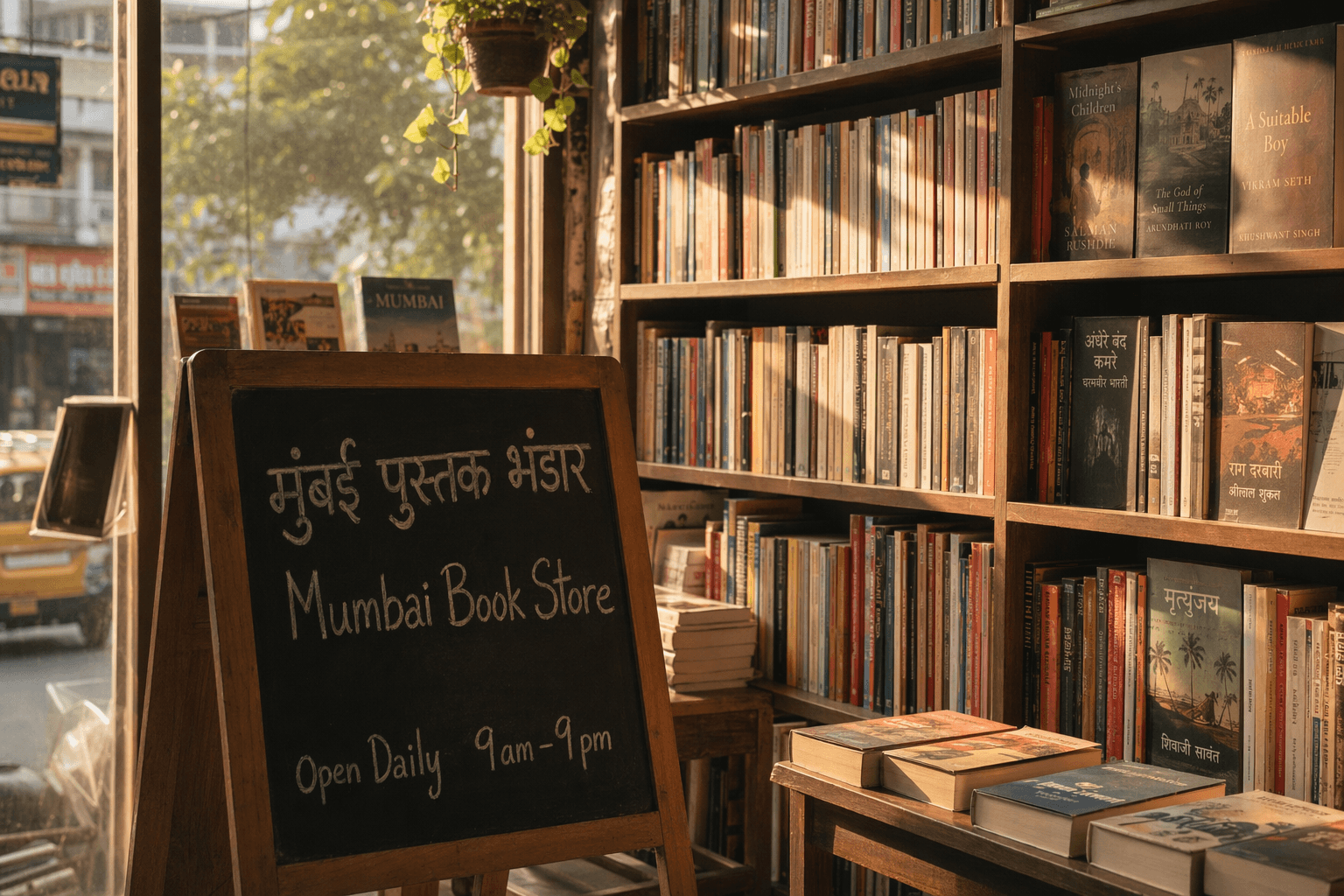
GPT Image 2 is the right choice anytime legible text is part of the image: magazine covers with headlines, product packaging mockups, storefront and signboard scenes, infographics and charts, storyboards and comic panels, multilingual ad creatives, UI screen mockups, and posters. In testing, it rendered a handwritten chalkboard easel combining English ("Mumbai Book Store", "Open Daily 9 am – 9 pm") and Hindi Devanagari ("मुंबई पुस्तक भंडार") cleanly on the first try. Edit mode (passing an image input) is ideal for relighting, background swaps, text changes on existing visuals, and brand-consistent variations.
Prompt Tips and Output Quality
Keep quality=high whenever typography matters — medium and low degrade fine lettering. Lead the prompt with subject, then typography in quotes, then style and lighting cues. For magazine-style layouts pick 1024x1536; for marketing banners and scenes, 1536x1024. Keep output_format=png and output_compression=100 when text crispness is non-negotiable.