Seedream 5.0 Free Prompt Guide: 17 Tested Prompts at $0.035 Each
This Seedream 5.0 free prompt guide has 17 prompts tested on Lite at $0.035 an image, with exact settings and the fixes that saved me re-rolls.
Seedream 5.0 is ByteDance's newest image model, the demos are strong, and the fastest way to learn it is to start from prompts someone has already tested. That is what this guide is, and it is free to read and copy: 17 prompts I ran on Seedream 5.0 Lite, with the exact wording, the settings, what came back, and the mistakes that would have cost you a re-roll.
The guide is free. Running the prompts is not: Seedream 5.0 Lite costs $0.035 per image on Segmind, which works out to about 285 images on a $10 top-up. The whole guide, 23 images plus one failed call, cost me $0.805.
TL;DR
- Every prompt here is free to copy. Running one on Seedream 5.0 Lite costs $0.035 per image at 2K or 3K, billed only on success.
- Quote every word you want in the image, and say "no other text". That one habit fixed brand names, labels and posters in my tests.
- English and Chinese text came back letter-perfect. Hindi did not. Devanagari is not an officially supported script and it shows.
- Use 3K. It costs the same $0.035 as 2K and gave me 2.25x the pixels.
max_imagesis a ceiling, not an order. Asking for 4 got me 1 until the prompt itself asked for "a set of four separate images".- Don't ask it for today's data. The API has no web search switch, and my "gold price this week" chart was dated October 2024.
What running these prompts costs
Every prompt in this guide ran on Seedream 5.0 Lite on Segmind. Here is what that costs as of 1 November 2026:
- $0.035 per image at 2K or 3K, billed only when an image comes back.
- Failed requests cost nothing. I hit one 400 error in this run and it billed $0.00.
- Pay as you go starts at a $10 top-up. The Pro plan ($39 a month) includes $50 of credits, and Business ($99 a month) includes $99, per the pricing page.
How far $10 goes
| Model on Segmind | Price per image | Images per $10 |
|---|---|---|
| Seedream 5.0 Lite (2K or 3K) | $0.035 | 285 |
| Seedream 4.5 | $0.04 | 250 |
| Seedream 5.0 Pro, 2K | $0.1068741 | 93 |
| Nano Banana 2, 2K | $0.12625 | 79 |
Prices are from each model's published spec on 1 November 2026. Every Lite fire in this guide billed exactly $0.035 per image, checked against the x-cost header on each response.
The prompt formula I used
Every prompt below follows the same order, which is also roughly what Segmind's own model page recommends:
- Subject and action: what is in the frame and what it is doing.
- Setting: surface, background, place.
- Light and camera: direction of light, lens, angle.
- Text, closed: "reads exactly these lines and no other text", with each line in quotes.
- Negations by surface: "no logos on the table or in the background", not just "no logos".
Step 4 does most of the work. Here is why.
Prompt 1 and 2: the vague prompt vs the closed prompt
I started with the kind of prompt most people type first.
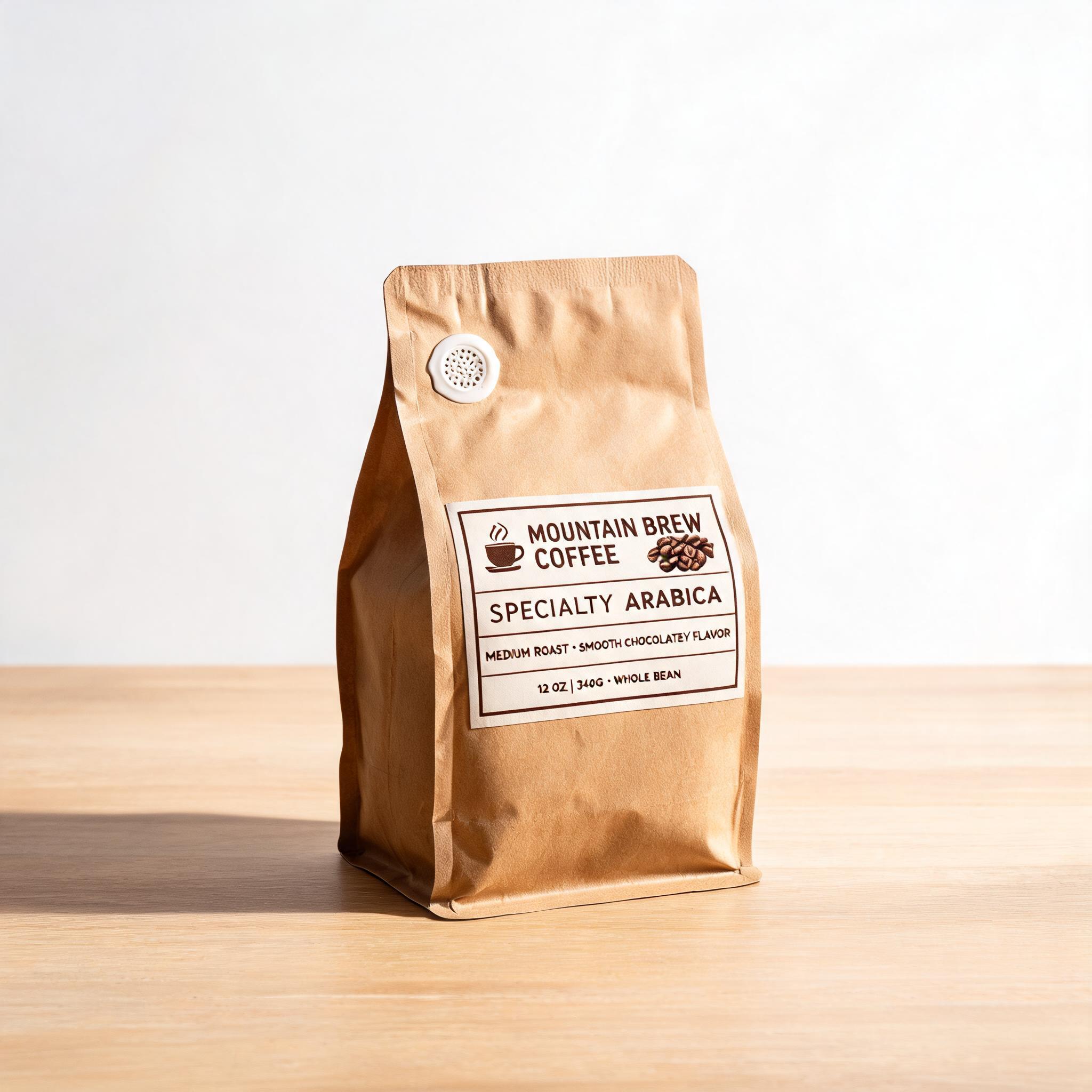
a coffee bag product photo
Then the same subject with the formula applied.
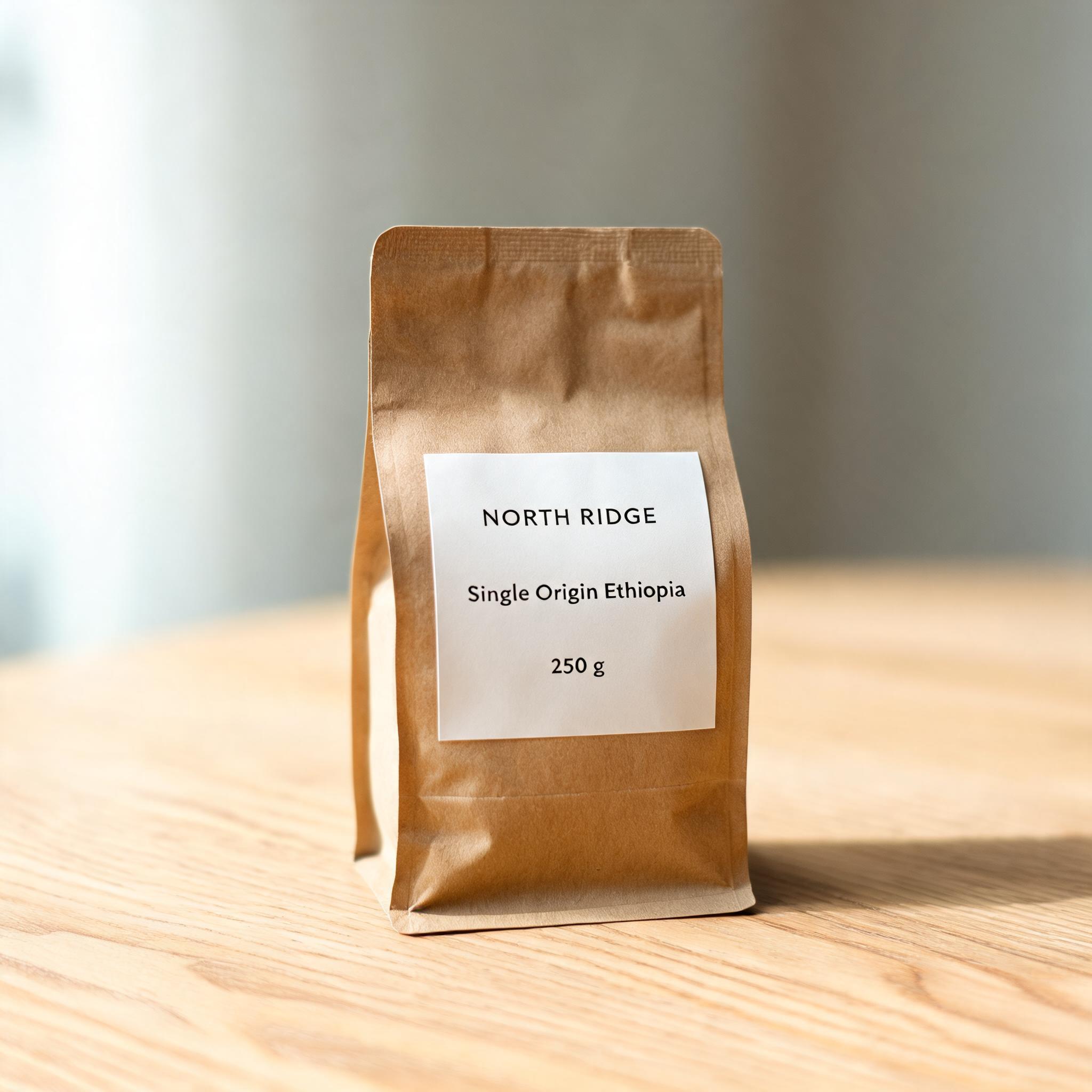
Studio packshot of a matte kraft-paper coffee bag standing upright on a pale oak table, soft window light from the left, a gentle shadow falling to the right, shallow depth of field, 85mm lens. The bag label reads exactly these three lines and no other text: "NORTH RIDGE" / "Single Origin Ethiopia" / "250 g". No logos, icons or text anywhere else, including on the table and in the background.
 Bare promptClosed prompt
The bare prompt is a good photo with a problem: it invented a whole brand, "MOUNTAIN BREW COFFEE", plus a tagline, a roast level and "12 OZ | 340G". If you were mocking up packaging for a client, all of that is copy you now have to paint out. The closed prompt came back with exactly my three lines, nothing else on the bag or the table, and light from the left with the shadow to the right as asked. Both took about 25 seconds.
Prompt 3: poster typography, and why 3K is the free upgrade
Minimalist screen-printed concert poster for a small jazz club night. A single upright double bass drawn in two flat colours, deep navy and warm orange, on an off-white paper texture. Large bold sans-serif headline at the top, small details at the bottom. The poster contains exactly these three lines of text and nothing else: "LATE SET" / "Friday 14 November" / "Doors 8 PM, Blue Room".
I ran it twice, once at size: 2K and once at 3K.
2K 3K
Both versions set all three lines correctly, comma included. The 3K file is 2592x3456, 2.25 times the pixels of the 2K file, and it billed the same $0.035. There is no seed parameter, so the two are different compositions, not an upscale. Unless you need a smaller file, there is no reason to leave size at its default of 2K.
Prompt 4: English and Chinese on one label
Product photo of a round tin of loose-leaf tea on a dark slate surface, steam rising from a small clay cup beside it, soft overhead light. The tin label carries exactly these three lines and no other text: "JADE HILL" / "高山乌龙茶" / "Oolong Tea 100 g". No other writing anywhere in the image.
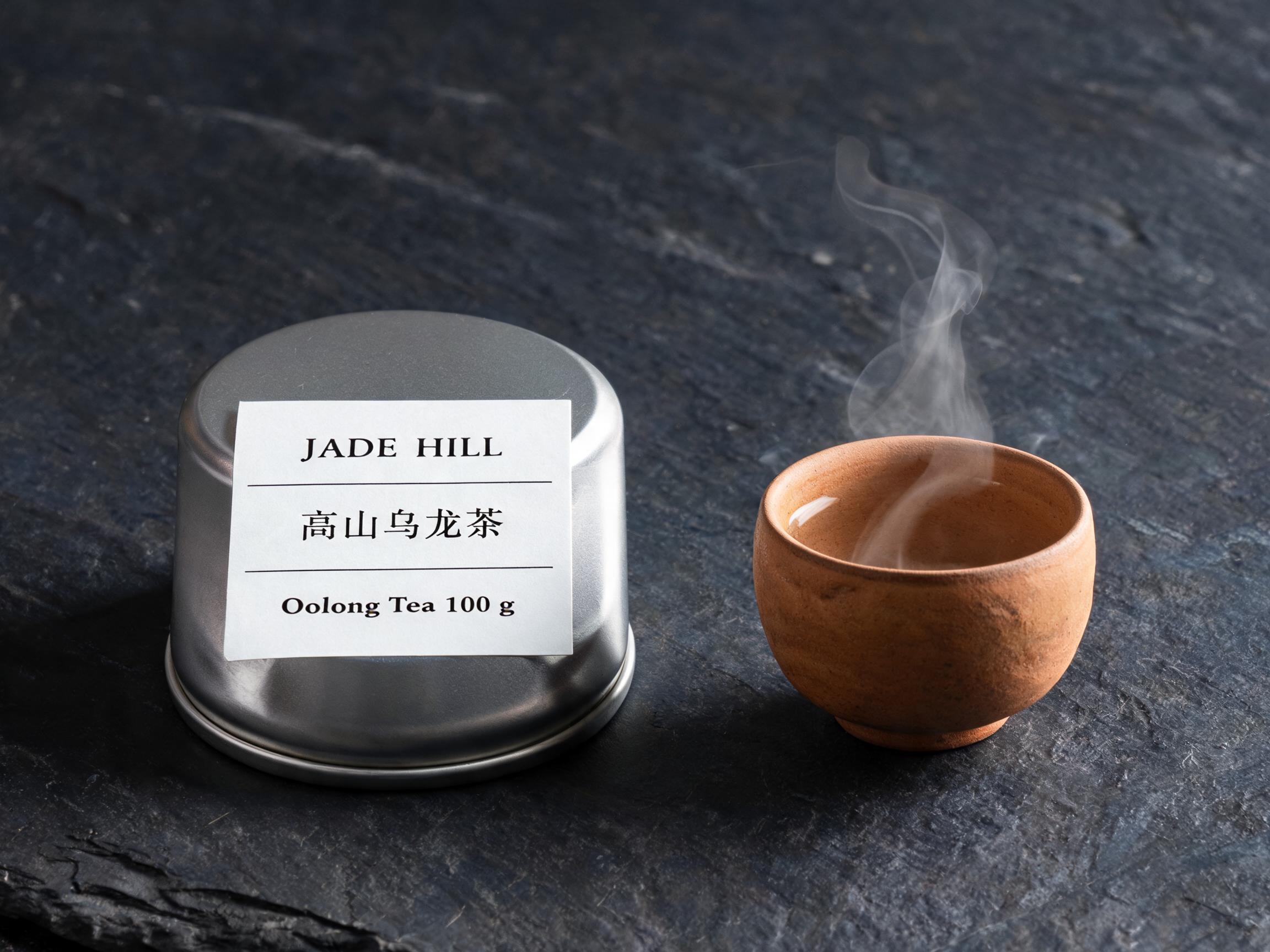
English and Chinese are the two languages Segmind lists as officially supported, and the model earns it here: 高山乌龙茶 is correct, character for character, and nothing else was written anywhere. The steam and the slate texture are a bonus.
Prompt 5: Hindi, where it breaks
Festive retail sale banner, warm marigold and deep magenta palette, glowing clay diyas along the bottom edge, clean modern layout. The banner carries exactly these two lines of text and nothing else: "दिवाली सेल" / "50% तक छूट".
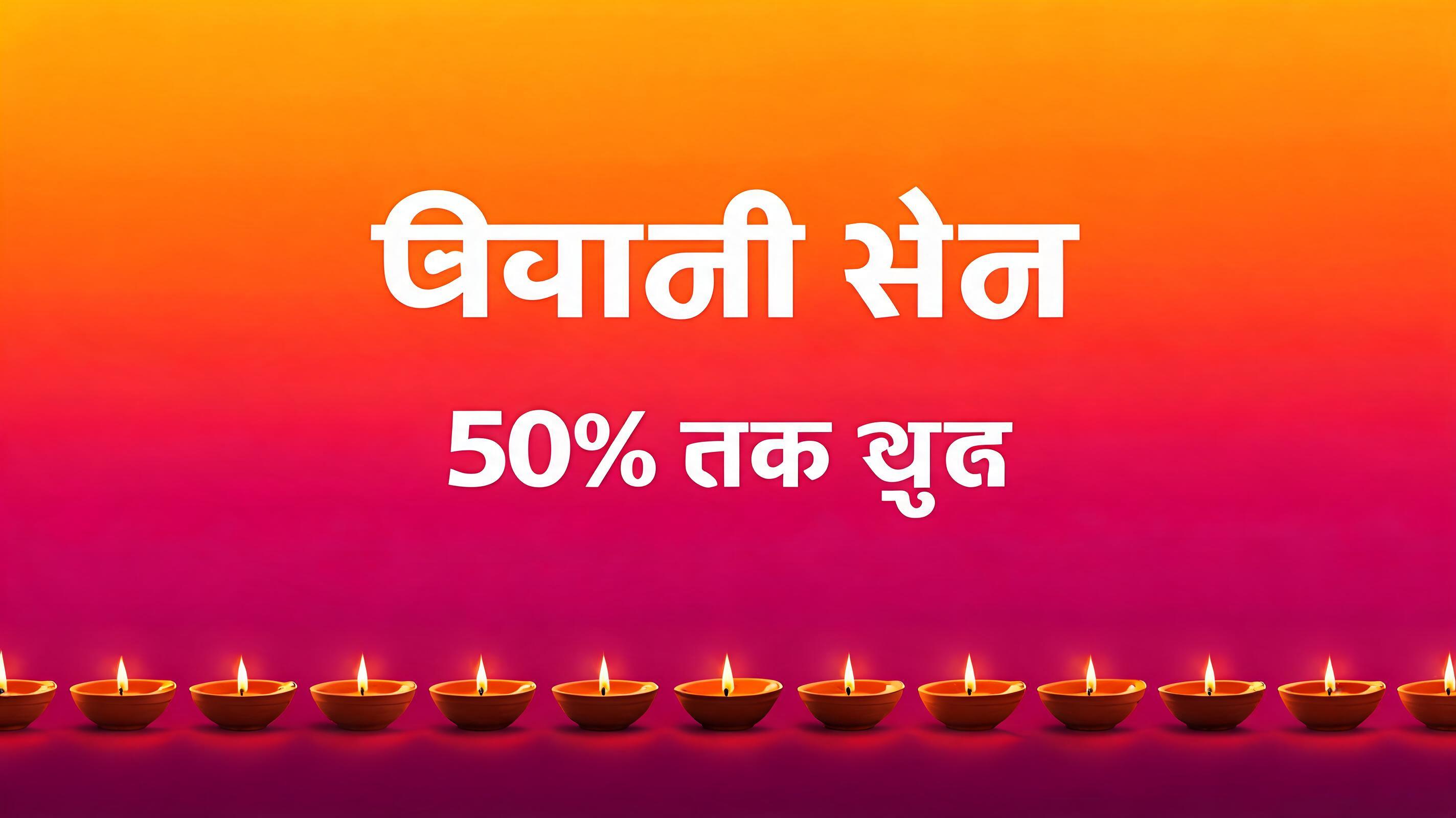
The design is lovely and the text is wrong. It got "50%" and "तक" right, then turned "दिवाली सेल" and "छूट" into shapes that look like Devanagari but are not words. A Hindi reader would spot it instantly. Same prompt rules, same closed text set: the limit is the script, not the prompt. For Indic text, generate the visual with Seedream and set the type yourself.
Prompt 6: a chart with exact numbers
Clean flat-design bar chart on a white background titled "Weekly running distance". Seven vertical bars, one per day, labelled Mon, Tue, Wed, Thu, Fri, Sat, Sun, with these exact values printed above each bar: 5.2 km, 0 km, 7.8 km, 3.1 km, 0 km, 12.4 km, 6.0 km. Bar heights must be proportional to the values. Teal bars, thin grey gridlines, no other text.
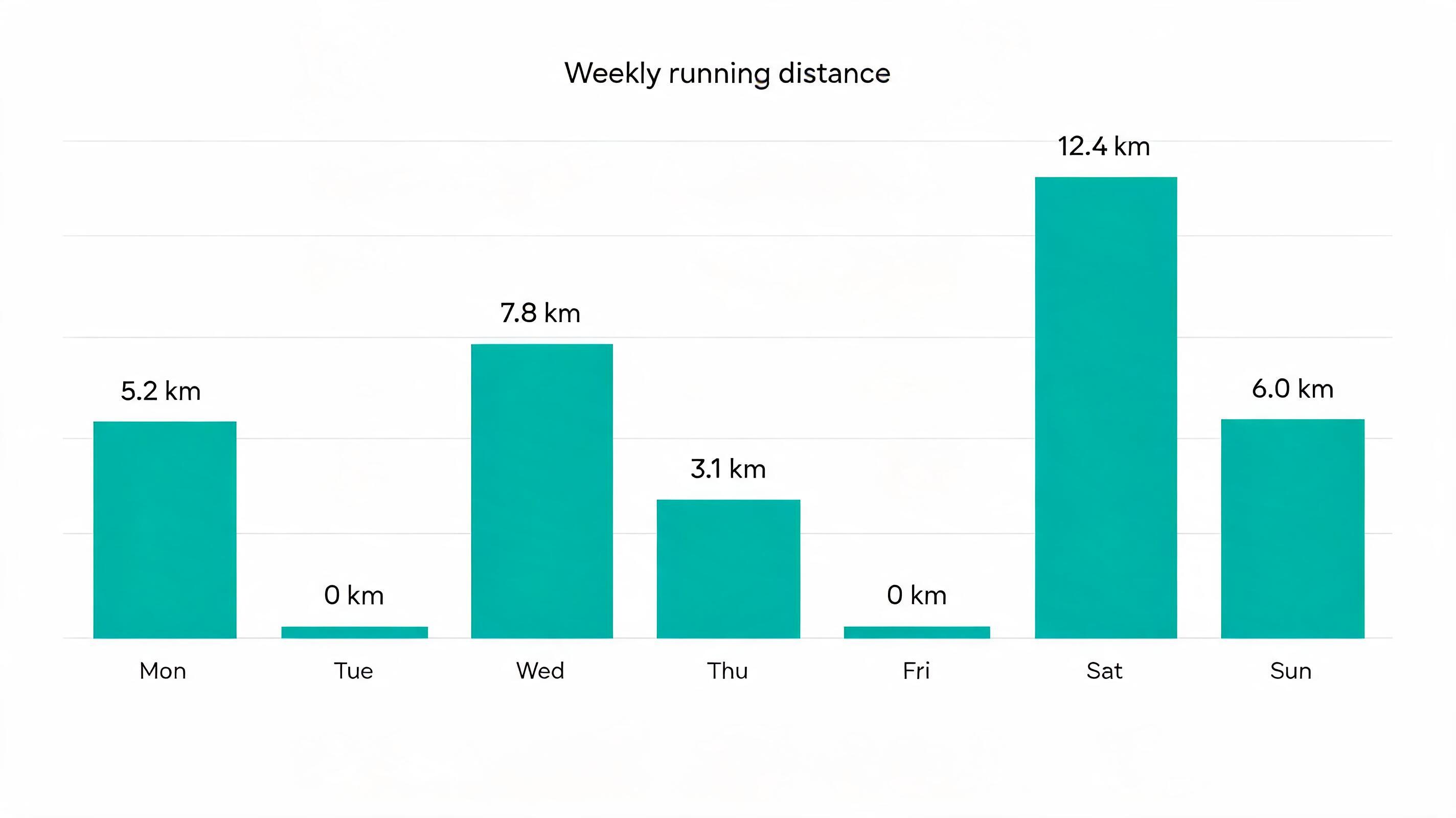
Every label and value is correct, and it added no text of its own. The heights are another story. I measured the bars in pixels against the 12.4 km Saturday bar: Thursday's 3.1 km bar is about 20% too tall, Monday's is 12% too tall, and Monday (5.2 km) ends up almost exactly as tall as Sunday (6.0 km). The zero days got a thin sliver instead of nothing. It looks right at a glance and is wrong under a ruler. For anything a reader might check, plot the chart in code and use Seedream for the illustration around it.
Prompt 7: spatial layout in a 3x3 grid
Top-down flat lay on a light linen tablecloth, arranged in a strict three-by-three grid with even spacing. Top row, left to right: a red apple, a brass key, a blue fountain pen. Middle row: a pocket watch, an empty white square, a pair of round glasses. Bottom row: a green leaf, a white coffee cup, a single yellow lemon. Soft even daylight, no shadows overlapping, no text.
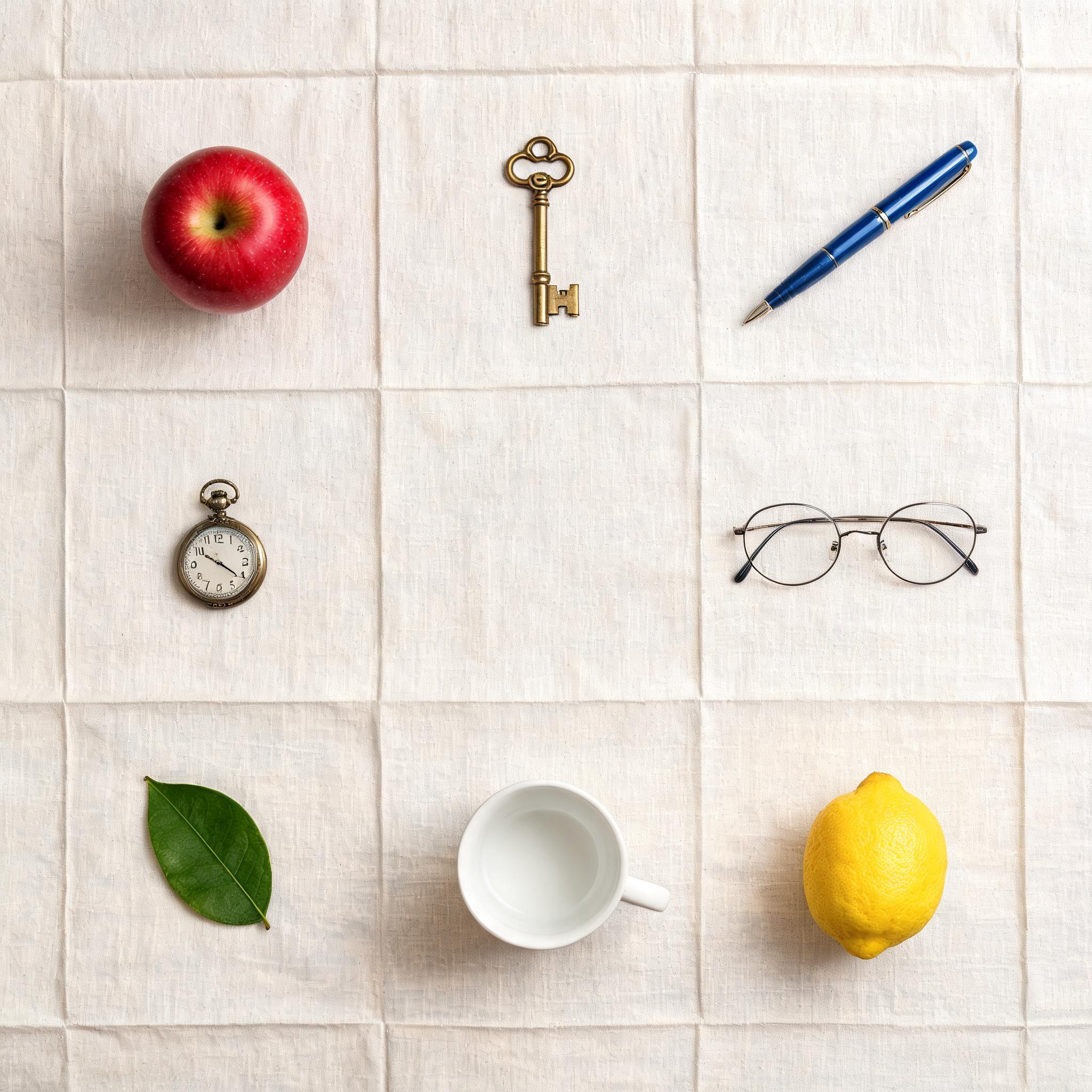
All nine positions are right, including the empty centre, which is the part most models fill in. Two details worth knowing: it took "grid" literally and creased the linen into squares, and the pocket watch face has garbled numerals, because that is text the model invented rather than text I gave it. If you want a clean dial, say "watch face with no numerals" or quote the numbers.
Prompt 8: the live data trap
Segmind's Seedream 5.0 Lite landing page talks up real-time web search. So I asked for something only a search could get right.
Clean financial infographic showing the gold spot price in US dollars per troy ounce for each of the last seven days up to today, as a line chart with the exact price labelled at every point and today's date in the title.
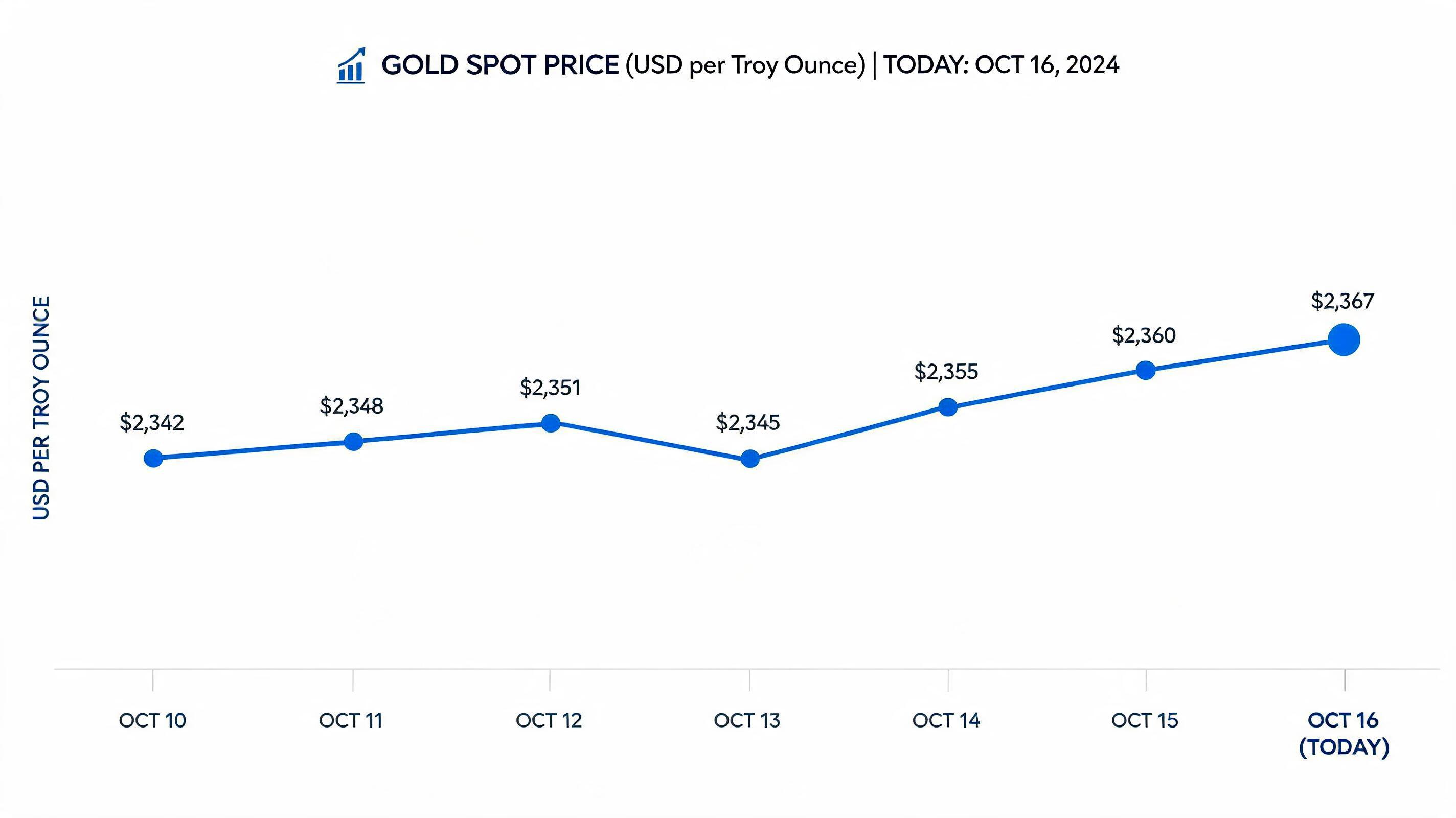
The chart is clean, and the title says "TODAY: OCT 16, 2024". I ran it on 1 November 2026. The prices it plotted ($2,342 to $2,367) don't match that 2024 date either: gold was trading above $2,600 then. The Segmind API for this model has no web search parameter, so every number here was made up. Nano Banana 2 does expose a web_search switch on Segmind if you need live grounding. With Seedream, put the data in the prompt yourself, as in Prompt 6.
Prompt 9: a cinematic still in 21:9
Cinematic film still, anamorphic widescreen. A lighthouse keeper in a yellow oilskin coat stands on wet black rocks at blue hour, facing a storm rolling in over the sea, the lighthouse beam cutting through rain behind him. Low camera angle, 35mm lens, cold teal shadows with one warm practical light from the lighthouse window, fine film grain.
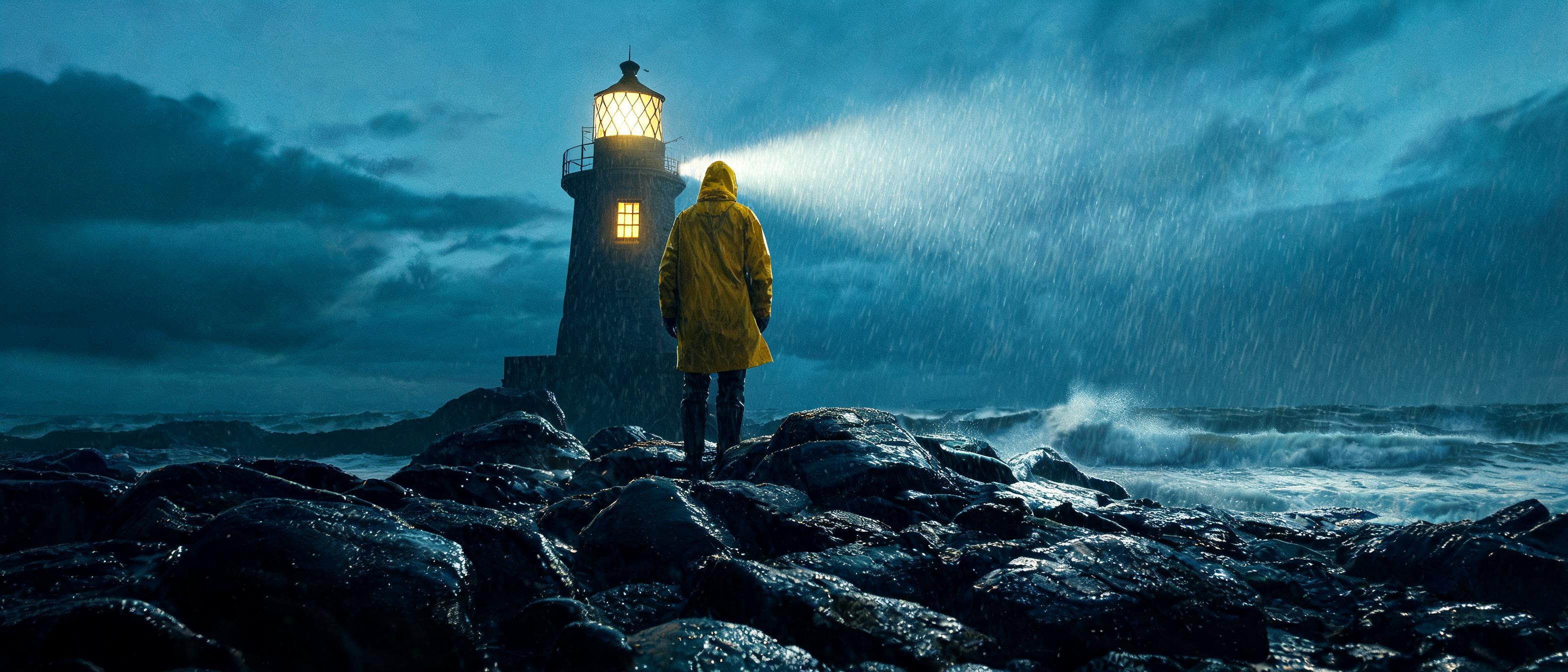
This is the one I would show a director. The colour split between teal shadows and the single warm window is exactly what I asked for, and the 3136x1344 frame holds up. One flaw: the beam starts right at his hood, so it reads as a headlamp rather than the lighthouse. "Behind him" was too loose. "The beam sweeps from the lantern room above, well clear of the figure" would pin it.
Prompt 10: a vertical story with a headline
Vertical social media story for a sneaker launch. A single unbranded white running shoe floats at the centre against a saturated tangerine background, a soft drop shadow below it, small motion lines. Bold condensed headline across the top reading exactly "SUMMER DROP" and a small line at the bottom reading exactly "06.15". No logos, swooshes, stripes or any other text on the shoe or background.
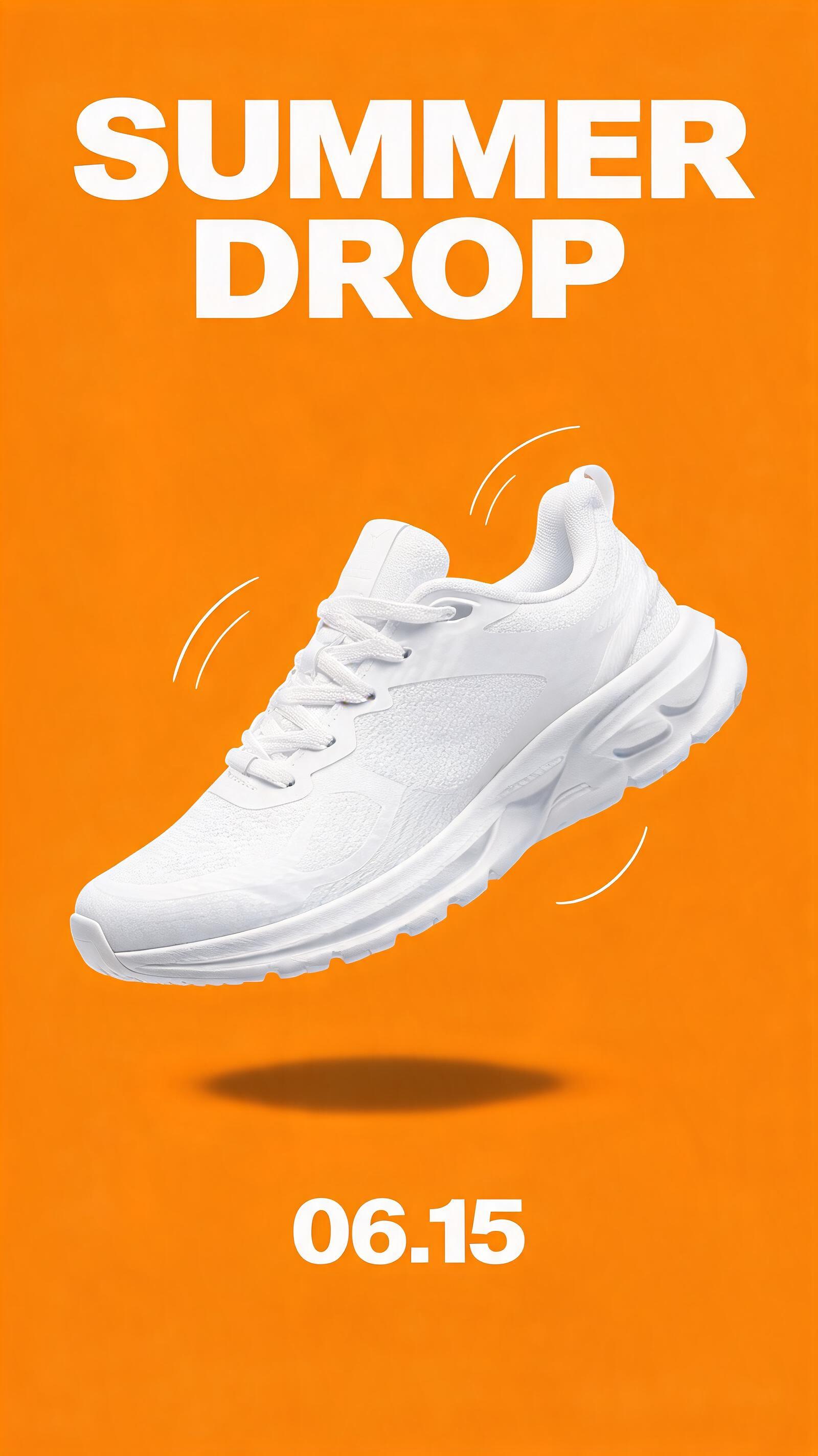
Both lines exact, and no borrowed brand marks on the shoe, which is why I named swooshes and stripes in the negation. At $0.035 this is cheap enough to generate a dozen colourways and test them.
Prompt 11: "no people" actually works
A narrow cobblestone street in an old European town at dawn, wet stones reflecting pale pink sky, shuttered windows, flower boxes. No people, no cars, no animals anywhere in the frame.
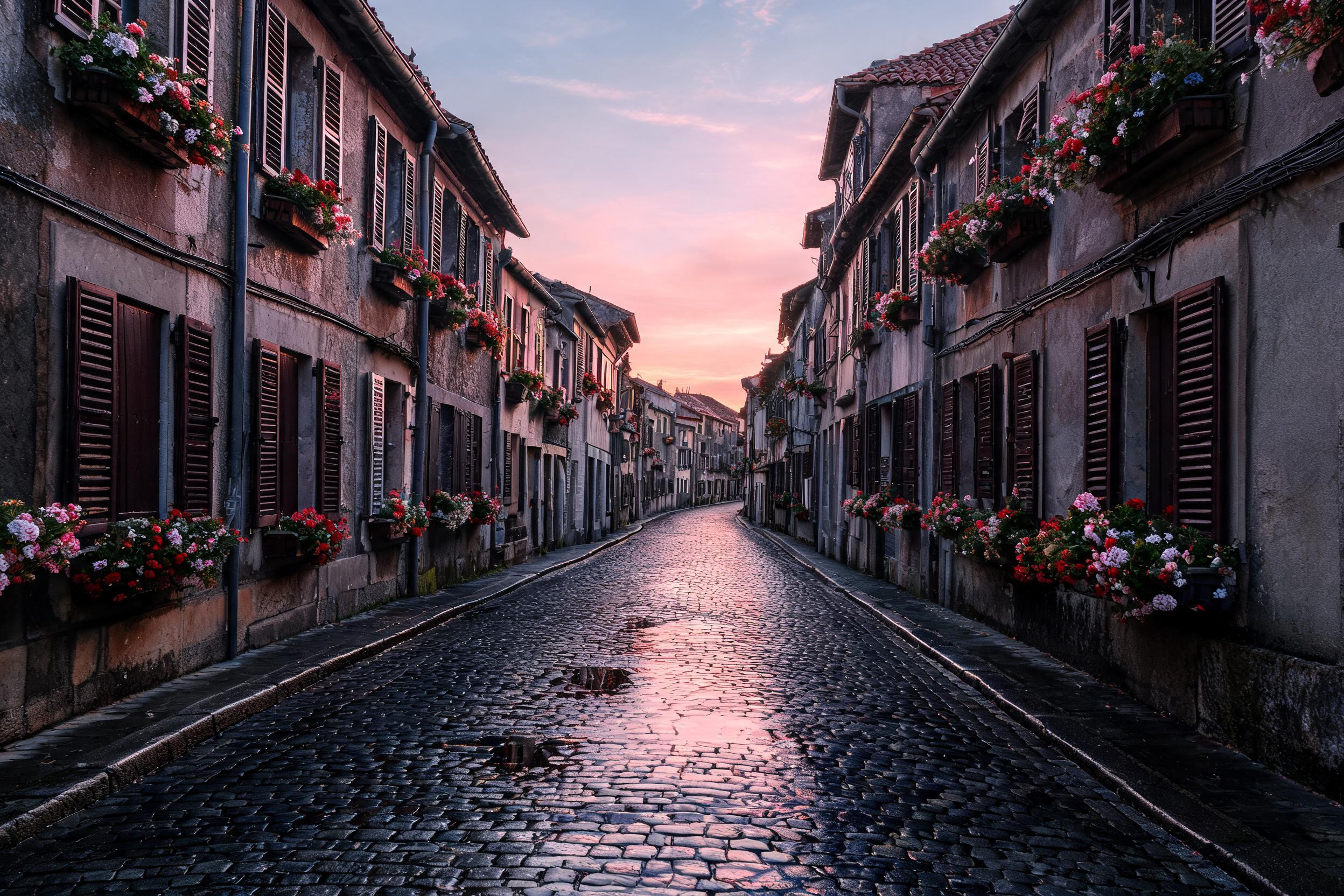
There is no negative prompt field, so negations go in the prompt, and here they held: not a person, car or pigeon anywhere. That makes it useful for background plates, and I reuse this exact frame in Prompts 16 and 17.
Prompt 12 and 13: batches, and why max_images surprised me
The spec says max_images generates up to 15 images per call. I asked for 4 with an ordinary prompt.
Character sheet of the same small round orange robot mascot with one large cyan eye and stubby arms, clean 3D render, plain light grey background. Show the robot waving hello.
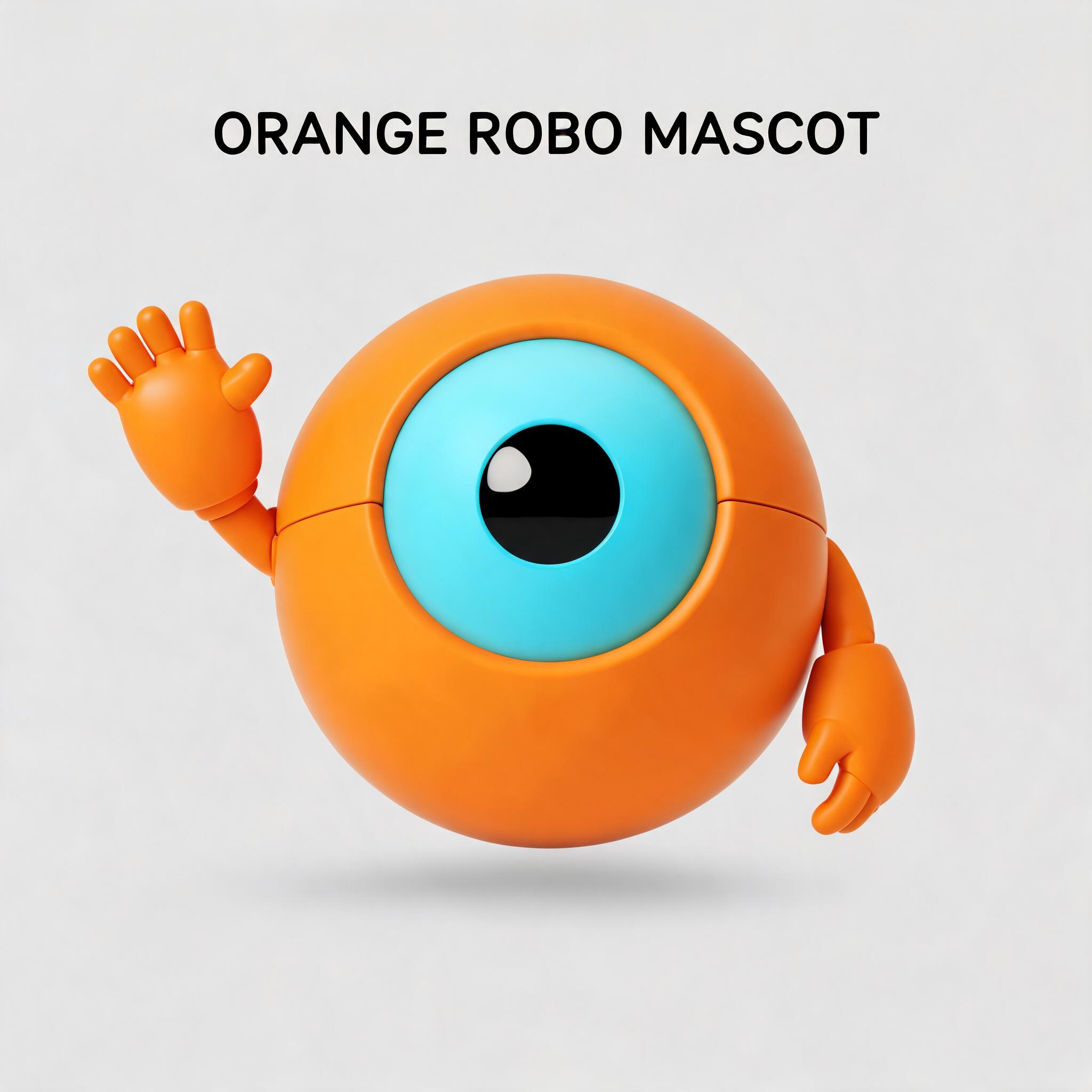
I got one image, billed $0.035, not four. "Character sheet" also made it add a caption, "ORANGE ROBO MASCOT", which I never asked for. max_images is a ceiling: the model decides how many images the prompt calls for, and you pay for what it makes. So I asked for a set in the prompt itself.
Generate a set of four separate images of the same small round orange robot mascot with one large cyan eye and stubby arms, clean 3D render, plain light grey background: image 1 waving hello, image 2 jumping with both arms up, image 3 sitting and reading a tiny book, image 4 sleeping curled up. No text in any image.
Waving Meant to sleep Arms up Reading
Four images, $0.14, and the character stays consistent across all four: same eye, same colour, same proportions, no caption this time. Three poses landed. The "sleeping" one came back awake with its arms folded, and the images did not come back in the order I numbered them.
One practical catch if you call the API directly: on both the synchronous endpoint and the v2 async endpoint, the response handed me only the first image of the batch, even though all four were billed. The other files were sitting next to it on the CDN with the same URL ending in _1, _2 and _3. Until that changes, read the extra outputs from your request history rather than assuming the response holds them.
Prompt 14: a one-line edit with image to image
The image to image endpoint takes a list of reference URLs. I fed it the coffee bag from Prompt 2.
Change only the colour of the coffee bag to deep forest green. Keep the white label, its three lines of text, the lighting, the table and the camera angle exactly as they are.
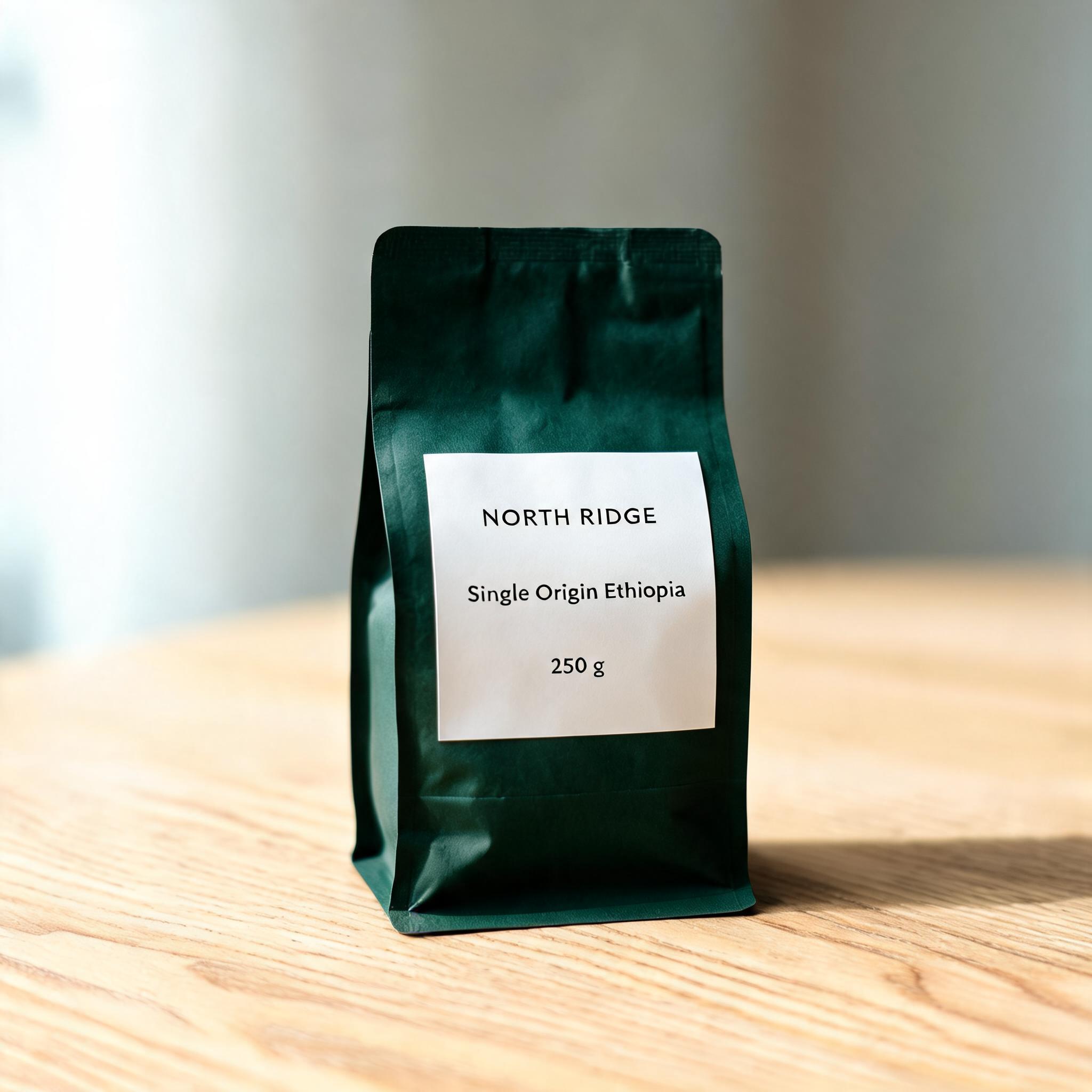 InputEdit
This is the cleanest edit I have had from a $0.035 call. The bag changed colour, the paper texture carried over, and the label, text, table grain and shadow stayed where they were. For colourway variants of a real product shot, this is the workflow.
# pip install "segmind>=1.1.0"
# export SEGMIND_API_KEY="YOUR_API_KEY"
import segmind

result = segmind.run(
    "seedream-v5-lite-image-to-image",
    prompt="Change only the colour of the coffee bag to deep forest green. Keep the white label, its three lines of text, the lighting, the table and the camera angle exactly as they are.",
    image_input=[
        "https://segmind-resources.s3.amazonaws.com/blog/seedream-5-free-prompt-guide-p02_struct.jpg",
    ],
    aspect_ratio="1:1",
    size="2K",
)
print(result.get("output"))
# 1. Submit the request; the reply carries its request_id
REQUEST_ID=$(curl -s -X POST "https://api.segmind.com/v2/seedream-v5-lite-image-to-image" \
-H "x-api-key: YOUR_API_KEY" \
-H "Content-Type: application/json" \
-d '{
"prompt": "Change only the colour of the coffee bag to deep forest green. Keep the white label, its three lines of text, the lighting, the table and the camera angle exactly as they are.",
"image_input": [
"https://segmind-resources.s3.amazonaws.com/blog/seedream-5-free-prompt-guide-p02_struct.jpg"
],
"aspect_ratio": "1:1",
"size": "2K"
}' | jq -r .request_id)
# 2. Check its status until it is COMPLETED
curl -s "https://api.segmind.com/v2/requests/$REQUEST_ID/status" \
-H "x-api-key: YOUR_API_KEY"
# 3. Fetch the result
curl -s "https://api.segmind.com/v2/requests/$REQUEST_ID" \
-H "x-api-key: YOUR_API_KEY"Prompt 15: from film still to storyboard
Redraw this scene as a loose hand-drawn storyboard frame: pencil linework with grey marker shading, only the raincoat in yellow, white paper border. Keep the composition, the lighthouse and the figure's position the same.
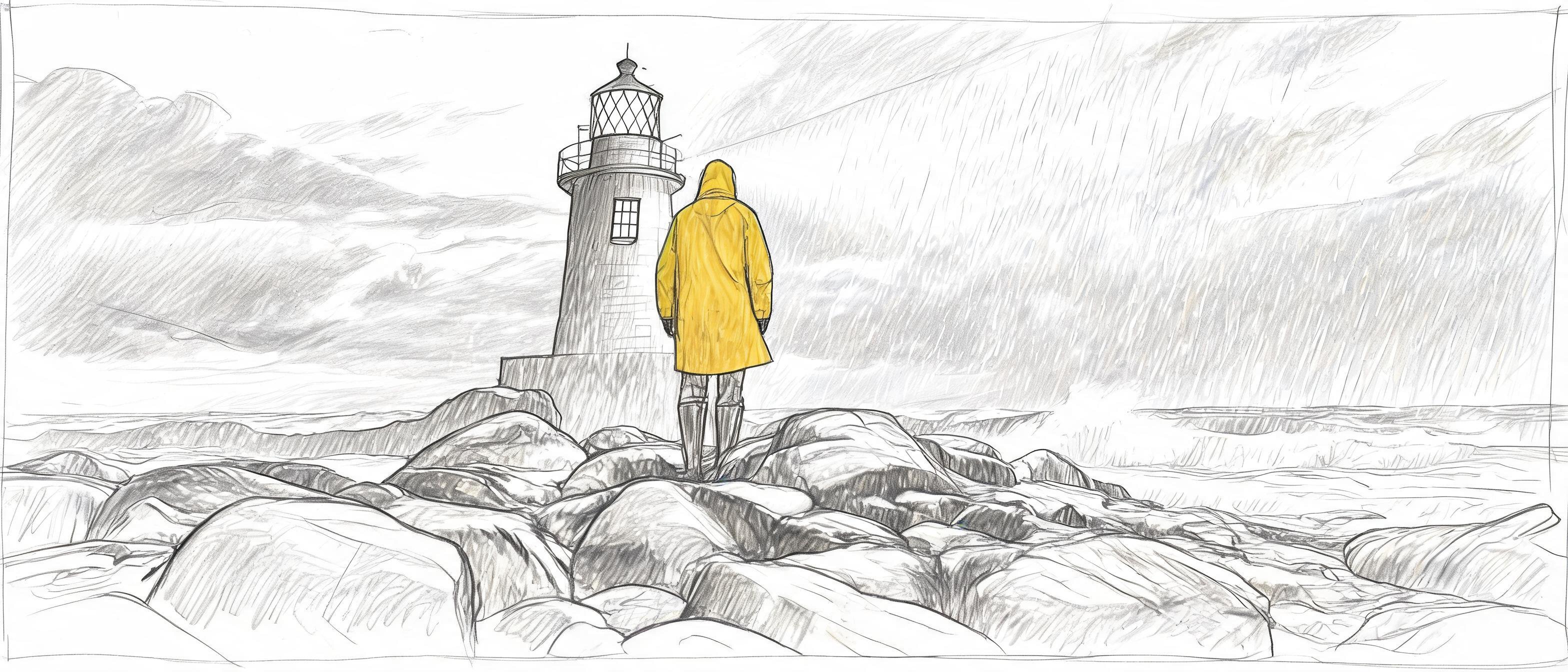 InputStoryboard
Composition, figure and lighthouse stayed put, and only the coat kept its colour. It quietly dropped the headlamp-looking beam too. For pre-vis teams, that is a cheap way to turn generated stills into boards that read as drafts rather than finished frames.
Prompt 16 and 17: two references, and the fix for small text
Last, I combined the coffee bag and the empty street from Prompt 11.
Place the coffee bag from image 1 on a small round bistro table in the middle of the cobblestone street from image 2, with a white espresso cup beside it. Keep the bag's label text exactly as it is, keep the dawn light and the empty street. No people.
The scene worked and the label didn't: "NOTTH RIDGE", a garbled origin line, and "200 g". The bag was small in the frame, and "keep the label text as it is" gave the model nothing to hold on to. So I quoted the lines, made the bag bigger and moved to 3K.
Place the coffee bag from image 1 on a small round bistro table in the middle of the cobblestone street from image 2, with a white espresso cup beside it. The bag is close to the camera and fills about a third of the frame. Its label reads exactly these three lines and no other text: "NORTH RIDGE" / "Single Origin Ethiopia" / "250 g". Keep the dawn light and the empty street. No people.
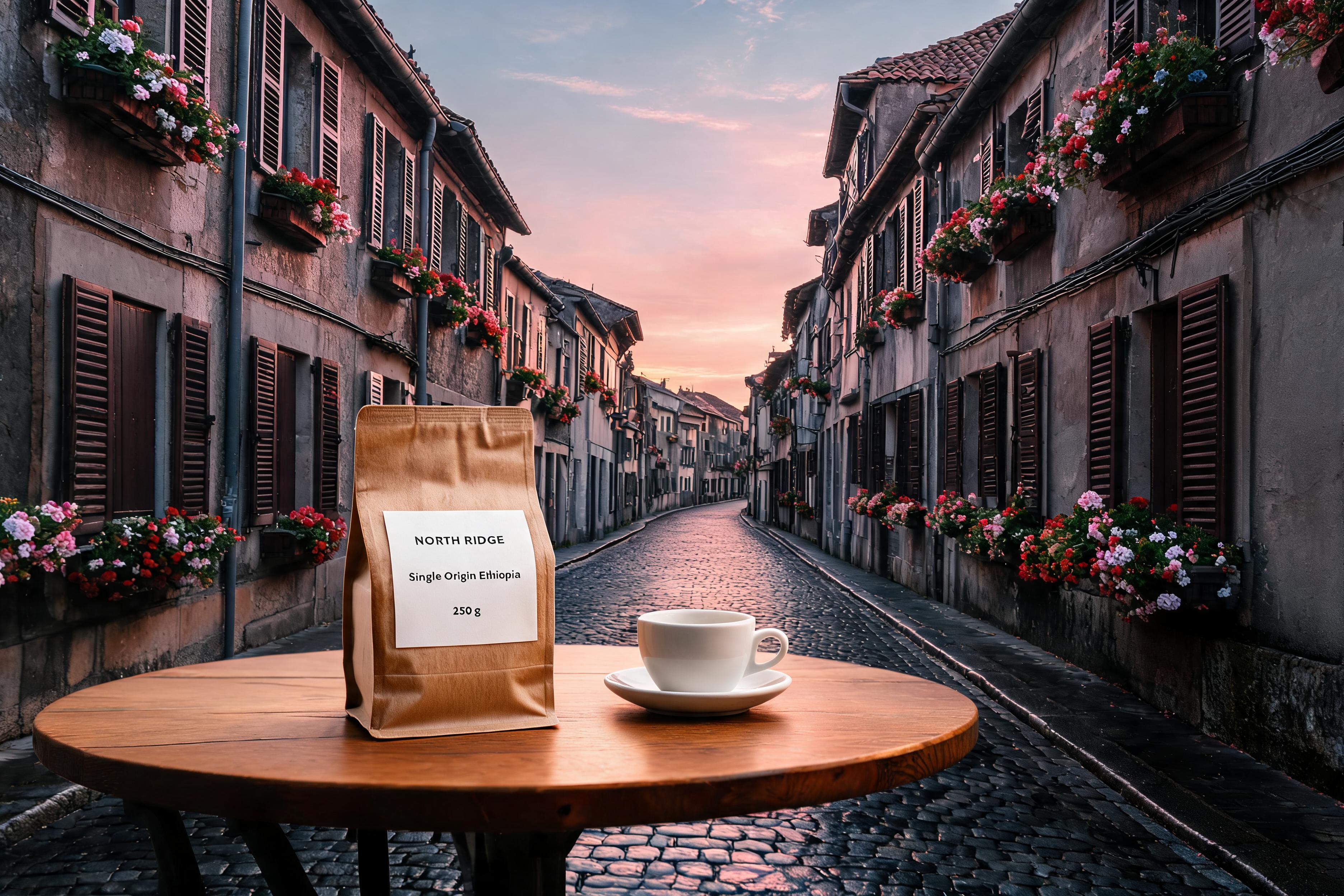
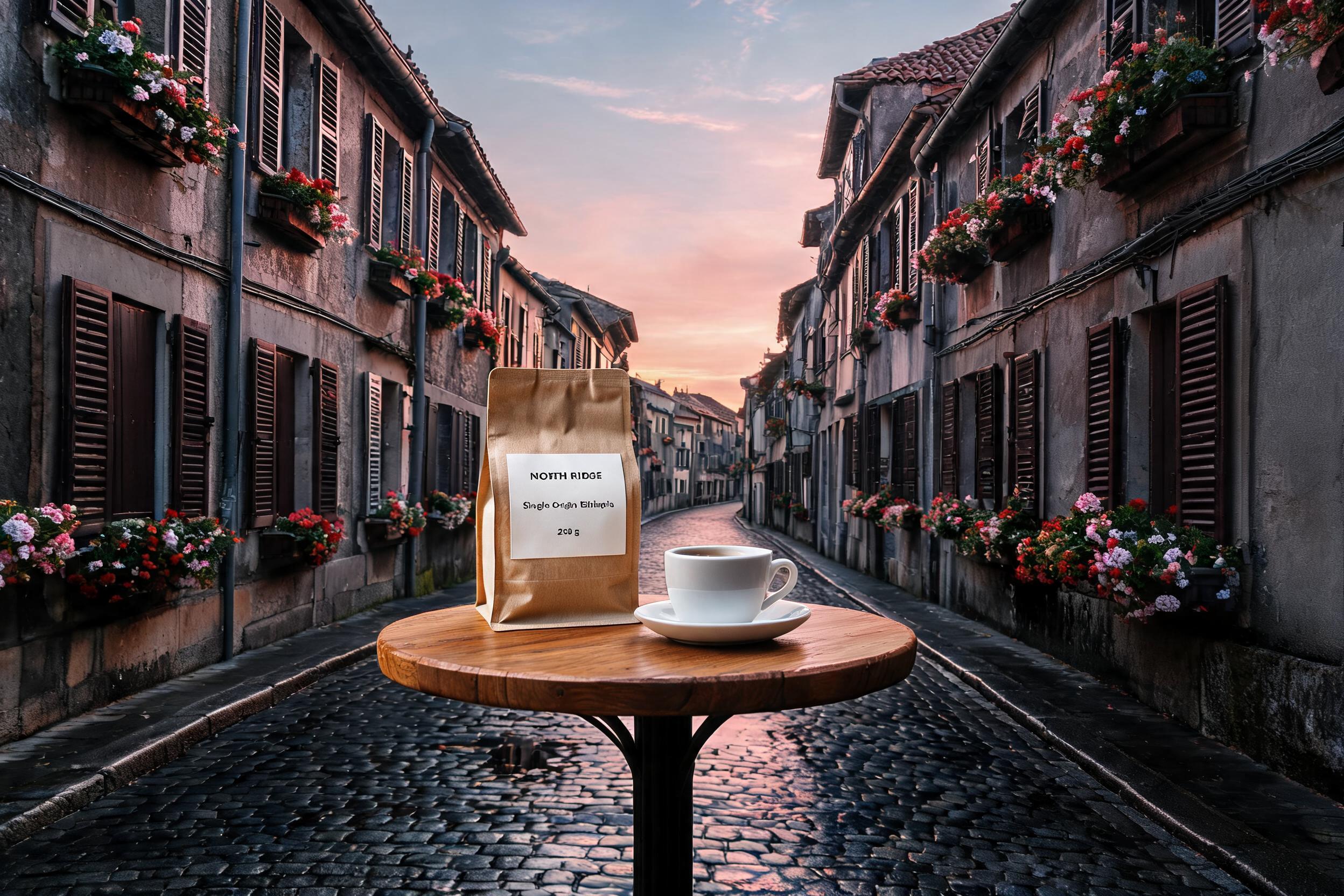 First tryFixed
Every line is right on the second try. To be straight about it, I changed three things at once (quoted text, a bigger bag, 3K), so I can't tell you which one did the work. Since all three are free, I would do all three every time.
# pip install "segmind>=1.1.0"
# export SEGMIND_API_KEY="YOUR_API_KEY"
import segmind

result = segmind.run(
    "seedream-v5-lite-image-to-image",
    prompt="Place the coffee bag from image 1 on a small round bistro table in the middle of the cobblestone street from image 2, with a white espresso cup beside it. The bag is close to the camera and fills about a third of the frame. Its label reads exactly these three lines and no other text: \"NORTH RIDGE\" / \"Single Origin Ethiopia\" / \"250 g\". Keep the dawn light and the empty street. No people.",
    image_input=[
        "https://segmind-resources.s3.amazonaws.com/blog/seedream-5-free-prompt-guide-p02_struct.jpg",
        "https://segmind-resources.s3.amazonaws.com/blog/seedream-5-free-prompt-guide-p14_empty.jpg",
    ],
    aspect_ratio="3:2",
    size="3K",
)
print(result.get("output"))
# 1. Submit the request; the reply carries its request_id
REQUEST_ID=$(curl -s -X POST "https://api.segmind.com/v2/seedream-v5-lite-image-to-image" \
-H "x-api-key: YOUR_API_KEY" \
-H "Content-Type: application/json" \
-d '{
"prompt": "Place the coffee bag from image 1 on a small round bistro table in the middle of the cobblestone street from image 2, with a white espresso cup beside it. The bag is close to the camera and fills about a third of the frame. Its label reads exactly these three lines and no other text: \"NORTH RIDGE\" / \"Single Origin Ethiopia\" / \"250 g\". Keep the dawn light and the empty street. No people.",
"image_input": [
"https://segmind-resources.s3.amazonaws.com/blog/seedream-5-free-prompt-guide-p02_struct.jpg",
"https://segmind-resources.s3.amazonaws.com/blog/seedream-5-free-prompt-guide-p14_empty.jpg"
],
"aspect_ratio": "3:2",
"size": "3K"
}' | jq -r .request_id)
# 2. Check its status until it is COMPLETED
curl -s "https://api.segmind.com/v2/requests/$REQUEST_ID/status" \
-H "x-api-key: YOUR_API_KEY"
# 3. Fetch the result
curl -s "https://api.segmind.com/v2/requests/$REQUEST_ID" \
-H "x-api-key: YOUR_API_KEY"What the spec says vs what I saw
| Setting | The docs say | What happened on 1 November 2026 |
|---|---|---|
optimize_prompt: fast | Faster drafts, suggested for stories and ideation | HTTP 400: "mode must be 'standard'". Billed $0.00. Leave it on standard. |
max_images | 1 to 15 images per call | A ceiling. You get the number the prompt asks for, and pay per image made. |
| Batch response | Not specified | Only the first image came back in the response. The rest were on the CDN. |
size | 2K for web, 3K for detail | Same $0.035. 3:4 came back 1728x2304 at 2K and 2592x3456 at 3K. |
| Output format | output.png in the examples | Every file was a JPEG. |
| Latency | ~39.2s average | Single images took 22 to 56 seconds on my clock, a 4-image set about 60. |
And here is the starter call, with the settings I would actually use:
# pip install "segmind>=1.1.0"
# export SEGMIND_API_KEY="YOUR_API_KEY"
import segmind

result = segmind.run(
    "seedream-v5-lite-text-to-image",
    prompt="Studio packshot of a matte kraft-paper coffee bag standing upright on a pale oak table, soft window light from the left. The bag label reads exactly these three lines and no other text: \"NORTH RIDGE\" / \"Single Origin Ethiopia\" / \"250 g\".",
    aspect_ratio="1:1",
    size="3K",
    max_images=1,
)
print(result.get("output"))
# 1. Submit the request; the reply carries its request_id
REQUEST_ID=$(curl -s -X POST "https://api.segmind.com/v2/seedream-v5-lite-text-to-image" \
-H "x-api-key: YOUR_API_KEY" \
-H "Content-Type: application/json" \
-d '{
"prompt": "Studio packshot of a matte kraft-paper coffee bag standing upright on a pale oak table, soft window light from the left. The bag label reads exactly these three lines and no other text: \"NORTH RIDGE\" / \"Single Origin Ethiopia\" / \"250 g\".",
"aspect_ratio": "1:1",
"size": "3K",
"max_images": 1
}' | jq -r .request_id)
# 2. Check its status until it is COMPLETED
curl -s "https://api.segmind.com/v2/requests/$REQUEST_ID/status" \
-H "x-api-key: YOUR_API_KEY"
# 3. Fetch the result
curl -s "https://api.segmind.com/v2/requests/$REQUEST_ID" \
-H "x-api-key: YOUR_API_KEY"FAQ
Is this Seedream 5.0 prompt guide free?
Yes. Every prompt, setting and API call in it is free to read and copy. Running them on Segmind is billed: Seedream 5.0 Lite costs $0.035 per image, a $10 top-up buys about 285 images, and failed requests are not charged.
How do I keep my Seedream 5.0 costs down?
Use 3K (same price as 2K), quote every piece of text you want, say "no other text", and draft at full quality rather than relying on optimize_prompt: fast, which returned an error in my tests.
Can Seedream 5.0 Lite write text in images?
Yes, very well in English and Chinese when you quote the exact text. It garbled Hindi in my test, and it garbles text it invents on its own, such as watch numerals or a caption you never asked for.
Does Seedream 5.0 Lite search the web?
Not through the Segmind API. There is no search parameter, and a prompt asking for this week's gold price produced a chart dated 2024 with invented numbers. Put real data in the prompt yourself.
What is the difference between Seedream 5.0 Lite and Seedream 5.0 Pro?
On Segmind, Lite is a flat $0.035 per image at 2K or 3K. Pro is priced by resolution, about $0.107 for 2K, and Segmind positions it for region-precise editing with multilingual text. For prompt testing and high-volume drafts, Lite is the one to start with.
My take
The prompts are free, and Lite is cheap enough that the real cost is the re-rolls you could have avoided. Close the text set, use 3K, keep Indic type and real data out of the model's hands, and ask for batches in the prompt rather than in a parameter. If you do that, a $10 top-up stretches to a couple of hundred usable images.
Try the prompts above on Seedream 5.0 Lite text to image and image to image. Each "Try it" button opens the model with my settings filled in.
 ModelSeedream 5.0 Lite: Text-to-ImageFast, affordable instruction-following image generation.
 ModelSeedream 5.0 Lite: Image-to-ImageTransform images intelligently with detailed text prompts.
- #seedream-5
- #ai-image
- #prompt-guide
- #seedream-v5-lite-text-to-image