How to Use Kling 4.0 Video Edit
Kling 4.0 Video Edit transforms an existing clip from a text instruction. Supply one source video and a prompt describing the change, and the model rewrites the look while keeping the original motion and camera recognizable. Add reference images when you need to bring in or swap specific objects and characters.
Write the prompt
State the change first, then name what should stay recognizable. "Transform the scene into a daytime thunderstorm; keep the subject's action and the camera framing" tells the model both the edit and the preservation goal. Keep the first edit narrow so you can see whether the instruction landed before stacking more changes. Use concrete, observable language for weather, lighting, materials and style rather than mood words.
Use reference images
Pass up to 10 images and name them @Image1, @Image2 in the prompt, giving each a role, for example "@Image1: replace the jacket" or "@Image1: keep this face". Clear roles make results more predictable; unlabeled references leave the model to guess. This is how you do object swaps and creative recreation.
Choose duration, resolution and framing
Match duration to your source length so nothing is trimmed or padded. Match resolution to the source: a 720p clip is best edited at 720p, while 1080p helps only when the input is genuinely high-resolution. Leave aspect ratio on adaptive to follow the source, or force 21:9, 16:9, 9:16 or 1:1 when you need a fixed frame.
Recommended Settings
Tested configuration that rendered cleanly: a 1280x720, 24 to 30 fps, 5-second MP4 source, with duration 5, resolution 720p and aspect_ratio adaptive. A prompt-only weather restyle (sunny midday plaza to a daytime thunderstorm) completed in roughly 70 to 90 seconds and preserved the subject's motion and framing. For higher-fidelity finals from a high-resolution source, move to 1080p; for drafts and iteration, stay at 720p.
Check the result
Generative editing does not guarantee that unmentioned details stay unchanged, and longer clips drift more toward the back half. Review faces, hands, on-screen text, logos and product shapes before publishing.
Examples to try
Each example below ran end to end on the same source clip at the settings shown (duration 5, resolution 720p, aspect_ratio adaptive); the breakdancer's windmill spin and the locked camera framing carry straight over into every edit.
- •Weather restyle (prompt only). Prompt: "Transform the scene into a violent daytime thunderstorm: towering slate-grey storm clouds roll over the plaza, heavy rain falls in sheets, a sharp lightning flash lights the glass towers, and the pale paving turns to a wet mirror with splashing puddles. Keep the breakdancer's windmill spin, his limbs and the locked camera framing exactly as in the source." The sunlit midday plaza becomes a dark, rain-slicked storm while the spin stays identical. Lead with the change, then name what to keep.
- •Artistic style restyle. Prompt: "Redraw the clip as a hand-drawn graphite pencil and charcoal sketch on textured off-white sketchbook paper: bold cross-hatching, loose construction lines, visible smudges and eraser marks, the whole frame monochrome grey on paper. Keep the breakdancer's windmill spin, his limbs and the locked camera framing exactly as in the source." Every frame turns into a cross-hatched drawing on paper. Name the medium and surface, and expect a monochrome result; keep the first edit to one style.
- •Material swap. Prompt: "Gild the entire scene in polished reflective gold: the stone plaza, the paving, the glass office towers and the breakdancer all become gleaming solid gold with bright specular highlights and sharp cast shadows. Keep the breakdancer's windmill spin, his limbs and the locked camera framing exactly as in the source." The paving, towers and dancer all read as mirror-bright gold. Name the material plainly, and review faces and hands, which drift most on fast motion.
Reference-guided edits
Pass up to 10 images and name them @Image1, @Image2 … in the prompt, giving each a role, to bring new objects or characters into a shot.
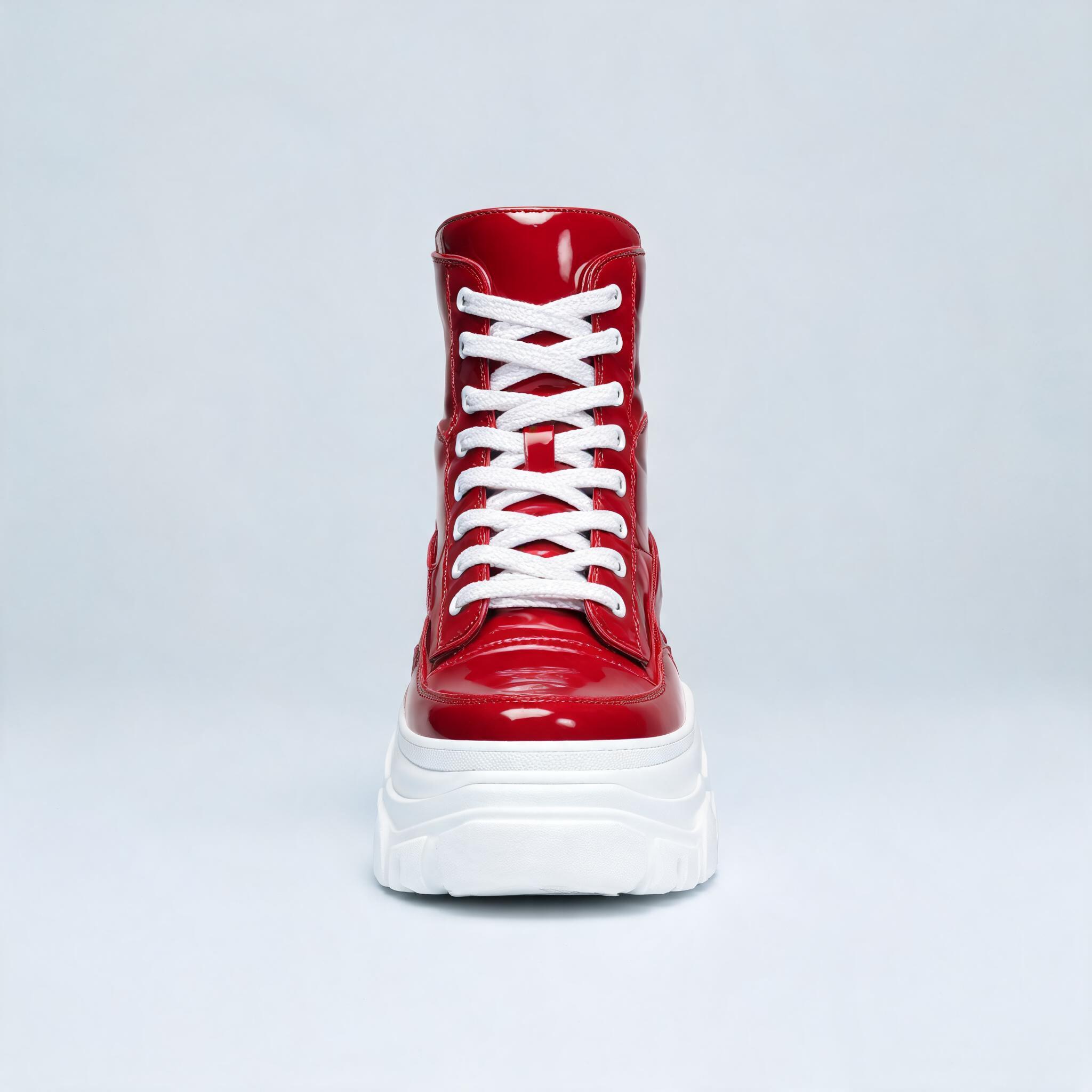
- •Insert a reference asset. Prompt: "@Image1: a giant cherry-red high-top sneaker sculpture. Place the sneaker sculpture from @Image1 upright on the plaza a few metres behind the breakdancer, scaled two storeys tall. Keep the breakdancer's windmill spin, his limbs, the hard midday light and the locked camera framing exactly as in the source." The red high-top from the reference stands building-tall behind the dancer. Say where the asset goes and how big; one clear asset reads best.
Other prompts the model is built for: "give the scene a foggy dawn, keep the action," "replace the background with the room in @Image1," or "turn the paving to cracked desert earth."