How to Prompt AI Video Editing: A Seedance 2.5 Edit Guide With Real Outputs
How to prompt AI video editing in Seedance 2.5 Edit: the target, change, lock formula, 18 real outputs, A/B tests and clip prep that keeps edits in sync.
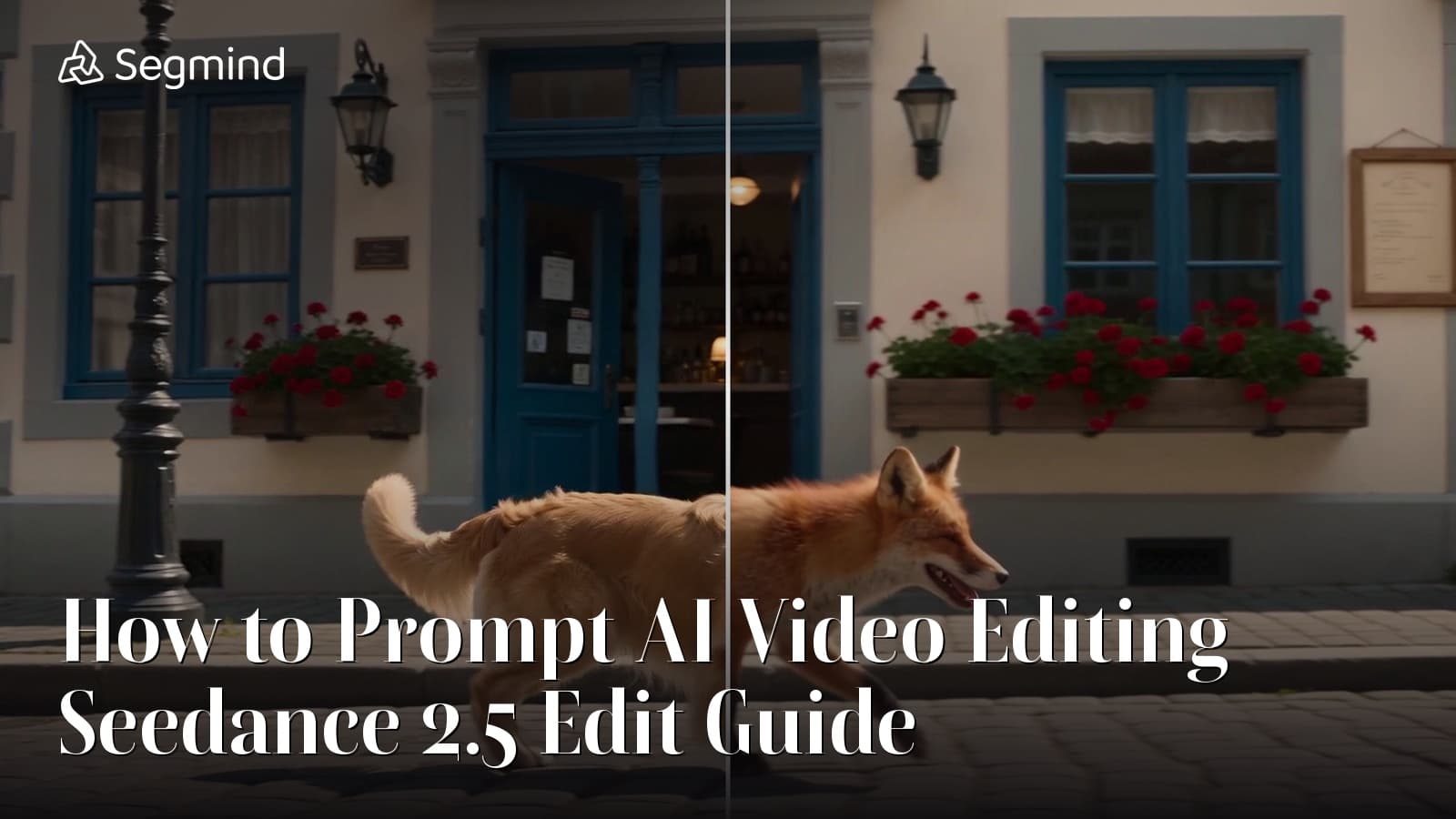
Prompting an AI video editor is a different skill from prompting a video generator. When I generate, I describe a whole scene. When I edit, the scene already exists, and my prompt has two jobs: say exactly what changes, and stop the model from touching anything else. Most prompt guides cover the first job and skip the second.
This is my guide to how to prompt AI video editing with Seedance 2.5 Edit, ByteDance's instruction-based editor on Segmind. It is built on eighteen real outputs: fifteen edits I ran on one 6 second street clip and trimmed copies of it, and the three examples on the model page, all reviewed frame by frame. Ten of those edits were A/B tests fired for this guide: a bare prompt against a scoped one, two edits stacked in one prompt against the same edits chained, a timestamped edit, a reworded restyle, a retried text edit, 480p against 720p, and four source lengths. I also read the main Seedance 2.5 editing guides published so far and checked their advice against what the model actually returned. Where the guides and my outputs disagree, I say so.
The short version
- Describe the change, not the scene. Start with a verb: replace, add, remove, change, restyle.
- Locate the target in words the model can see in every frame: "the black iron lampposts", not "the stuff on the left".
- Lock what must stay, as cheap insurance. On my swap it changed almost nothing, because the model already preserves what you do not name.
- Stacking works for compatible edits. Three changes in one prompt all landed. Chain passes when you want to approve each step.
- Do not time edits with timestamps. "From 3 seconds" was ignored.
- Rewording will not rescue a take. With the seed fixed, a rephrased prompt came back as nearly the same video. Change the instruction or the seed.
- Prep the clip before you prompt. Trim to 8n+1 frames (121 or 145 at 24 fps), or the edit comes back shorter, faster and out of sync with its own soundtrack.
- Keep text short and in plain view. One word on open wall worked; three words squeezed into the top edge did not.
Why an edit prompt is not a generation prompt
Seedance 2.5 Edit takes a source clip (@Video 1) and a text instruction, and its spec makes the contract explicit: "Everything you do not mention stays as it is." There is no duration or aspect ratio field. The output inherits both from the source, so none of your prompt should be spent on framing, length or format.
That changes what a good prompt looks like. A full cinematic description ("A red fox trots along a sunlit cobblestone street in a European old town, tracking shot, golden light") is a text-to-video prompt. Sent to an editor, it asks the model to re-imagine the shot. Morphic's guide warns that a loosely phrased edit can come back as a brand new clip. If your prompt names no edit at all, Segmind's endpoint prepends "Edit @Video 1:" for you, which tells you how the model expects to be addressed.
An edit prompt is a work order. It reads like a note to a VFX artist, not a shot list.
The edit prompt formula: target, change, lock
Every prompt that worked for me follows the same three-part shape, and it matches what the published guides converge on:
[Verb] [the target, located precisely] in @Video 1 [into / with the change, described concretely],
keeping [the subject's motion and timing], [what surrounds it], [the camera move] and [the lighting] unchanged.
| Part | What it does | Example wording |
|---|---|---|
| Verb | Picks the operation | Replace, Add, Remove, Turn, Redraw, Change the soundtrack |
| Target | Says where to look | "the golden retriever", "both black iron lampposts and the red bicycle" |
| Change | Says what the result looks like | "a red fox of the same size", "a snowy winter evening" |
| Lock | Says what must survive | "keeping its exact trotting gait, the cafe facade, the camera move and the lighting unchanged" |
The lock clause looks redundant, given that the model already preserves what you do not mention, so I tested it. The result is in Edit 1: on a subject swap it made almost no difference. I still write it, because it costs nothing and it is the only place you can say which things you care about most, but the verb, the target and the change are what move the output.
The source clip
Every edit below, except the three model-page examples, used this clip or a trimmed copy of it: 6 seconds, 1280x720, 24 fps, a golden retriever trotting past a cafe while the camera tracks sideways. It has a moving subject, a busy facade, street furniture to remove and a wall to write on. There are no people in it, because Seedance 2.5 Edit refuses real human faces.
Edit 1: replace the subject
The most requested edit: same take, different subject. The test is whether the new subject inherits the old one's motion.
In @Video 1: Replace the golden retriever with a red fox of the same size, keeping its exact trotting gait, its path along the pavement, the cafe facade, the camera move and the lighting unchanged.
This is the edit Seedance does best. The fox has rust fur and dark legs, and it moves with the retriever's gait, at the same height in frame, along the same line. The windows, flower boxes and lanterns hold.
Does the lock clause matter? Bare against scoped
The guides all say to spell out what must stay. To check, I sent the same clip with the same seed and nothing but the instruction:
In @Video 1: Replace the golden retriever with a red fox.
- Scoped prompt
- Bare prompt
The bare prompt gave the same fox, the same stride and the same street. Measured frame by frame, the two outputs score 0.95 on structural similarity (SSIM, where 1.0 is identical), and their facades match the source equally well. The fox was the same size without "of the same size", and it kept the dog's gait without being told to.
So for a clean subject swap on a simple shot, the model's default preservation does the work. I keep the lock clause for busier shots and for things the model might reasonably treat as part of the target, such as a leash, a shadow or a reflection, where saying "keep" is the only way to fence them off. Just do not expect it to rescue a weak instruction.
Edit 2: remove objects
Clean plates are where an editor earns its keep: a stray sign, a crew bag, a competitor's bike.
In @Video 1: Remove the black iron lampposts and the red bicycle from the street, filling the wall and pavement behind them naturally. Keep the dog, the cafe facade, the camera move and the lighting unchanged.
Every lamppost went, and so did the bicycle, which only enters the frame in the last second. The wall and cobbles behind them were filled in without a smear, and the wall lanterns, which I had not mentioned, were left alone.
The prompt lessons: name every instance ("the lampposts", plural, plus "the red bicycle"), and say what fills the gap. "Filling the wall and pavement behind them naturally" gives the model a target for the hole instead of leaving it to guess.
Edit 3: add an object
This example comes from the model page, on its own source: a tin robot marching across a workbench.
Add a small red wind-up toy train rolling across the front edge of the workshop bench in @Video 1, keeping the marching tin toy robot, the colourful building blocks and the lighting exactly as they are.

This was the most surgical edit in this guide. I compared it with its source frame by frame: the frames line up one for one, and the top third of the picture, where nothing was added, matches the source at 41 dB PSNR on a downscaled comparison, which is effectively untouched. The robot, blocks and window light are essentially the same pixels.
One thing the prompt did not control: when the train appears. It only rolls in about 4 seconds into a 5 second clip. "Rolling across the front edge" says where, not when. Do not count on fixing that in the prompt: when I asked for a change at a specific second (the timestamp test under Edit 4), Seedance put it somewhere else. If the moment matters, trim the source so the clip starts where the action should.
Edit 4: change the weather and time of day
A global edit has to change almost every pixel while keeping the geometry.
In @Video 1: Turn the scene into a snowy winter evening: snow falling steadily, a thin layer of snow on the cobblestones and window boxes, dusky blue light, and warm yellow light glowing from the cafe windows and lanterns. Keep the dog's trotting gait, the buildings and the camera move unchanged.
The concrete consequences landed: a layer of snow on the pavement and window boxes, the lanterns switched on, and the dog relit to match the dusk. The abstract ones landed less well. The grade is greyer than "dusky blue", and there is no curtain of falling snow.
That pattern is the lesson for global edits. Describe the scene change as a list of visible consequences ("snow on the window boxes", "light glowing from the lanterns") rather than a mood, because the consequences are what the model executes. Put the most important one first.
Can you time an edit? I tried a timestamp
Timestamps are a common suggestion for scoping an edit to part of a clip. I asked for dusk to fall at the 3 second mark, and said outright to leave the first 3 seconds alone:
In @Video 1: From the 3 second mark to the end of the clip, the scene shifts from bright midday to a deep blue dusk and the wall lanterns switch on, glowing warm yellow. Before 3 seconds, keep the original midday light exactly as it is. Keep the dog, the buildings and the camera move unchanged.
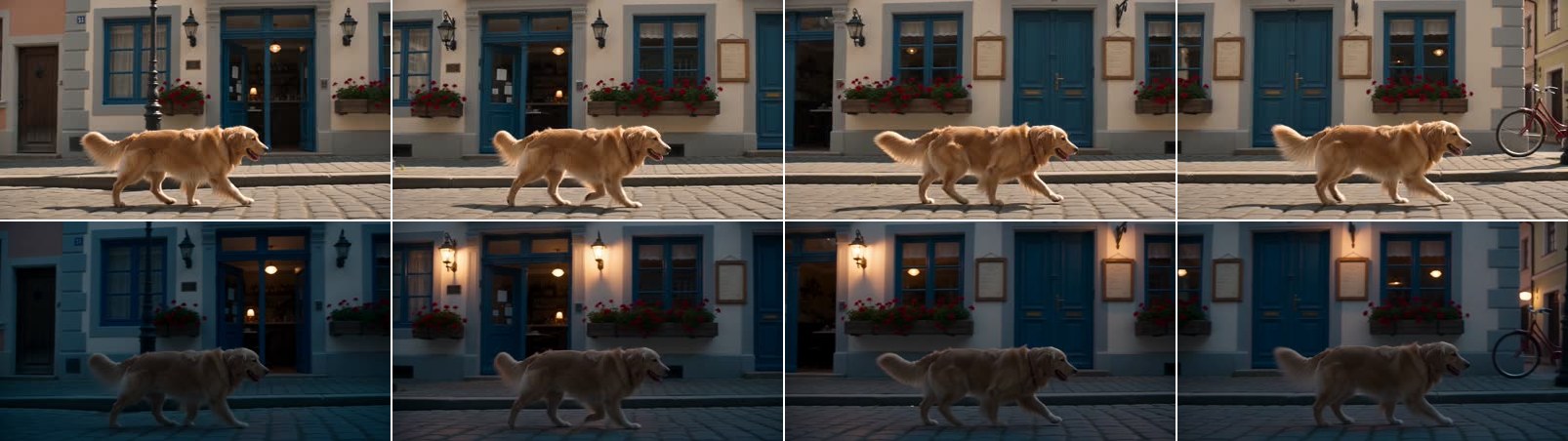
The edit happened, but not when I asked. The whole clip is dusk from frame one, and the average brightness never steps up or down at the 3 second mark. The lanterns did switch on as an event, at about 1.2 seconds instead of 3. The model treated "switch on" as something to show happening, and placed it on its own schedule.
If an edit must cover only part of a clip, cut that part out, edit it, and splice it back in your editor. That also bills less, because you only pay for the seconds you send.
Edit 5: restyle the whole clip
In @Video 1: Redraw the entire clip as a hand-painted watercolour animation on textured paper, with soft washes of colour and loose ink outlines. Keep the dog's motion, the street layout and the camera move exactly as in the source.

Seedance kept the framing and motion perfectly, and gave the walls and doors a washed, painterly texture. The dog picked up soft shading and outlines but stayed much closer to photoreal than the street. "The entire clip" was not enough to pull the subject fully into the style.
Rewording the restyle: same seed, same video
My first theory was the wording: the lock clause said "keep the dog's motion", which may have read as "keep the dog". So I named the dog inside the change and took it out of the lock clause:
In @Video 1: Redraw the entire clip, including the golden retriever, the cobblestone street and the buildings, as a hand-painted watercolour animation on textured paper, with soft washes of colour and loose ink outlines. Keep the camera move and the timing of every movement exactly as in the source.
It came back as nearly the same video: 0.985 SSIM against the first version. Naming the dog changed nothing I could see.
This is the most useful thing the tests taught me. With a fixed seed, the source clip and the seed decide the render, and a rephrasing that keeps the same intent lands on the same result. When a take is wrong, rewording it is the slowest fix. Either change what you are asking for (a stronger style, a different target) or change the seed and get a genuinely new take.
Edit 6: match a reference image
Seedance 2.5 Edit takes up to 30 reference images, cited in order as @Image 1, @Image 2. This is the model page's example.

Restyle the marching tin toy robot in @Video 1 to match the ornate brass clockwork robot in @Image 1, with brass panels, exposed gears and a glass dome head, keeping its exact marching motion, the workshop bench, the colourful building blocks and the lighting unchanged.
The robot takes on the brass panels and gear detail and keeps its march. The rule the guides agree on, and this example follows: map each reference to one object in the source. "The robot in @Video 1 to match the robot in @Image 1" is unambiguous. "Use @Image 1 as reference" is not. Restating the key features in words ("brass panels, exposed gears") backs up the image, and a clean single-subject reference on a plain background carries further than adjectives alone.
Edit 7: add on-screen text (failed once, then worked)
In @Video 1: Add the words BLUE DOOR BAKERY in large gold serif letters painted across the cream wall above the blue doors, matching the wall's perspective and lighting and holding steady as the camera moves. Keep the dog, the street and everything else unchanged.

Seedance put a faded BLUE DOOR right at the top edge of the frame and BAKERY only appears in fragments. Looking at the source explains part of it: the strip of wall above the doors is barely in shot, so the model squeezed the lettering into the only space my prompt pointed at.
So I retried with one word, on open wall at window height, in a spot the camera passes slowly. I ran it at 480p, the cheapest tier, which makes it a harder test for lettering, not an easier one.
In @Video 1: Paint the single word BAKERY in large gold capital letters on the cream wall at window height, just to the right of the first blue door, matching the wall's perspective and lighting so it moves with the wall as the camera tracks. Keep the dog, the street and everything else unchanged.
This time the word is spelled correctly, sits flat on the wall and slides past with it as the camera tracks. The cost of the request was hidden in the framing: to make room, Seedance replaced the window to the right of the door with plain wall, and it added a small gold emblem above the word that I never asked for.
Three lessons. Keep text to a word or two. Put it on a surface with room for it, or the model will make room by removing something. And when the words have to be exact, as with a price or a subtitle, or when an invented logo would be a problem, as with a real brand, add them in your editing software. Two of the three guides I read say the same.
Two edits at once, or one after the other
The guides I read say one change per prompt. I tested it. First, three changes in one prompt:
In @Video 1: Replace the golden retriever with a red fox of the same size, turn the scene into a snowy winter evening with snow on the cobblestones, and remove the black iron lampposts and the red bicycle. Keep the camera move unchanged.
All three landed. The fox has the dog's gait, the pavement and window boxes carry snow, the lanterns are lit, and both lampposts and the late bicycle are gone. The snow is better than in my single weather edit, probably because "snow on the cobblestones" is a concrete consequence and nothing else competed for it. As in Edit 4, there is no falling snow.
Then the chained route: I took the fox clip from Edit 1 and ran the removal prompt from Edit 2 on it, with "the fox" in the lock clause instead of "the dog".
That worked too. The fox survived the second pass intact and the street is clean. The chained clip did not get shorter again either: the fox clip was already 137 frames, and pass two returned 137 (the frame-count section below explains why).
| Passes | Billed | What you can do | |
|---|---|---|---|
| Stacked: fox, snow, removal | 1 | $1.70 | Take it or leave it |
| Chained: fox, then removal | 2 | $1.70 + $1.56 = $3.26 | Approve or redo each step |
So stacking is fine when the edits do not compete: one subject, one global look, one removal. It is the cheaper route. Chain when you need to sign off each change separately, or when one edit keeps failing and you do not want to re-roll the others with it.
Prep the clip before you write the prompt
Two things about the source file decide whether a good prompt gives you a usable edit. Neither is in the prompt.
Trim to 8n+1 frames
The docs say the output keeps the source's length. On my first street clip it did not. I had trimmed it to a tidy 6.00 seconds, 144 frames, and every edit came back with 137 frames, 5.71 seconds. It does not cut the ending. It plays the whole action about 5% faster: by the last frame, the picture is 7 frames ahead of the source.
To find the rule, I cut the same clip to three more lengths and ran the Edit 1 fox prompt on each at 480p, then added the chained pass from the section above, whose source was a 137 frame Seedance output:
| Source frames | Seconds at 24 fps | Output frames | Result |
|---|---|---|---|
| 97 | 4.04 | 97 | Frame for frame |
| 120 | 5.00 | 113 | 6% fast |
| 121 | 5.04 | 121 | Frame for frame |
| 137 | 5.71 | 137 | Frame for frame |
| 144 | 6.00 | 137 | 5% fast |
The 144 frame clip came back at 137 frames at both 480p and 720p, so resolution does not change this. Every output is a multiple of 8 plus 1. When the source already is (97, 121, 137), Seedance keeps it frame for frame. When it is not (120, 144), the edit squeezes the whole clip down to the next 8n+1 below and plays it faster to fit. The round-number trims, which are what most editing software gives you, are exactly the ones that break.
At 24 fps, adding one frame to a whole second gives you a safe length: 97 for 4 s, 121 for 5 s, 145 for 6 s, 193 for 8 s. Before trimming, make sure the source really is 24 fps.
# keep exactly 145 frames (6 s at 24 fps) for a Seedance 2.5 Edit source
ffmpeg -i source.mp4 -vf "fps=24" -frames:v 145 -c:v libx264 -crf 16 -c:a aac -shortest trimmed.mp4
Plan for the soundtrack
With generate_audio: true the spec says the clip's soundtrack is kept. What I measured is more nuanced. The audio's shape follows the source closely, with the dog's claw clicks landing at the same moments (a loudness-envelope correlation of about 0.9 on four of my first five edits, and 0.90 on the 121 frame trim), but it is not your original file: every one of my fifteen edits came back at 32 kHz, none matching the source sample for sample. On the retimed clips that matters, because the soundtrack stayed on the source's timeline while the picture ran 5% fast, so by the end the claws hit after the paws do. On the 8n+1 trims, picture and sound stayed together.
If the clip carries dialogue or music you need to keep, lay your original audio back on in the edit, and get the frame count right so the picture lines up with it. generate_audio: false does not return your original audio either: per the spec, it returns a file with no audio track.
What an edit costs, and why you need more balance than that
Seedance 2.5 Edit bills video tokens for the clip it reads and the clip it writes, so an edit costs roughly twice a generation of the same length. My 6 second 720p edits each billed $1.7037: 900 tokens per frame for 144 source frames plus 137 output frames, at $6.736832 per million tokens. The same edit billed $1.659 a day earlier, at $6.56 per million, so check the pricing page before you budget. At 480p it is about 400 tokens per frame: my 5 second 480p edit billed $0.65, and the 4 second one $0.52.
| Resolution | Rate (per billed second) | 5 s edit | 10 s edit |
|---|---|---|---|
| 480p | $0.0637 | $0.64 | $1.27 |
| 720p | $0.1429 | $1.43 | $2.86 |
| 1080p | $0.3519 | $3.52 | $7.04 |
Rates from the Seedance 2.5 Edit pricing page. Reference images and audio add nothing.
The catch is the credit hold. Before an edit starts, Segmind reserves enough for the longest edit the model accepts, a 30 second clip, at your resolution. I hit this twice while preparing this post: the API asked for at least $3.82 of free balance at 480p and $21.11 at 1080p, and $8.80 at 720p on the day I ran the tests. Holds stack, so two 720p edits in flight need about $17.60 free: with $17.45 in the account, my second job was refused until the first one finished. The hold settles to the real price when the edit finishes, but you need the headroom to start.
Iterate at 480p, but know what it predicts
The obvious way to save money is to find the wording at 480p and render the final at 720p. I ran the Edit 1 fox prompt at 480p with the same seed to see how much carries over:
- 720p, $1.66
- 480p, $0.76
Everything the source decides carried over: framing, path, gait, timing and the street. The fox itself did not. Its fur and tail differ, and the two outputs score 0.76 SSIM against each other, against 0.95 for two different wordings at the same resolution. That is the right way to use a 480p pass: it tells you whether the edit works and what it touches, for under half the price. It does not preview the exact final render, so judge fine detail at the resolution you will ship.
At 1080p, also set output_codec: h264 if the file is going on a web page, because the default 10-bit HEVC master does not play in Chrome or Firefox on Windows.
Five prompting mistakes to avoid
- Writing a scene description. "A fox trots down a sunny street" is a generation prompt. "Replace the dog with a fox" is an edit.
- Rewording a bad take. With the seed fixed, a rephrased prompt that asks for the same thing returns nearly the same video. Change the request or the seed.
- Vague praise. "Make it cinematic" names no target and no change. Say what cinematic means here: "darken the shadows and warm the window light".
- Asking for exact text. Do it in post.
- Trusting timestamps. "From 3 seconds" was ignored: my dusk covered the whole clip. Cut the section out and edit only that.
Run it through the API
The endpoint is synchronous and returns the MP4. My edits took 154 to 318 seconds each, so set a long timeout or use the v2 async endpoint, which returns a request id at once and reports the exact billed cost when the job completes.
# pip install "segmind>=1.1.0"
# export SEGMIND_API_KEY="YOUR_API_KEY"
import segmind

result = segmind.run(
    "seedance-2.5-edit",
    video="https://segmind-resources.s3.amazonaws.com/blog/video-edit-showdown-source.mp4",
    prompt="In @Video 1: Replace the golden retriever with a red fox of the same size, keeping its exact trotting gait, its path along the pavement, the cafe facade, the camera move and the lighting unchanged.",
    resolution="720p",
    generate_audio=True,
    seed=42,
)
print(result.get("output"))
# 1. Submit the request; the reply carries its request_id
REQUEST_ID=$(curl -s -X POST "https://api.segmind.com/v2/seedance-2.5-edit" \
-H "x-api-key: YOUR_API_KEY" \
-H "Content-Type: application/json" \
-d '{
"video": "https://segmind-resources.s3.amazonaws.com/blog/video-edit-showdown-source.mp4",
"prompt": "In @Video 1: Replace the golden retriever with a red fox of the same size, keeping its exact trotting gait, its path along the pavement, the cafe facade, the camera move and the lighting unchanged.",
"resolution": "720p",
"generate_audio": true,
"seed": 42
}' | jq -r .request_id)
# 2. Check its status until it is COMPLETED
curl -s "https://api.segmind.com/v2/requests/$REQUEST_ID/status" \
-H "x-api-key: YOUR_API_KEY"
# 3. Fetch the result
curl -s "https://api.segmind.com/v2/requests/$REQUEST_ID" \
-H "x-api-key: YOUR_API_KEY"FAQ
How do I write a prompt for AI video editing?
Start with a verb (replace, add, remove, change), name the target precisely, describe the result concretely, and end with what must stay the same: the subject's motion, its surroundings, the camera move and the lighting. Describe visible consequences, not moods.
Do I need to describe the whole scene in a Seedance 2.5 Edit prompt?
No. The model keeps everything you do not mention. Describing the whole scene invites it to re-imagine the shot.
Can Seedance 2.5 Edit change the length or aspect ratio?
No. Both come from the source clip and neither can be set. Trim the source to a frame count of 8n+1 (97, 121, 145 or 193 at 24 fps), or the output comes back shorter and plays faster.
Can I make several edits in one prompt?
Yes, if they do not compete. A fox swap, a snowy evening and a removal in one prompt all landed in a single $1.70 pass. Chain separate passes when you want to approve each change.
Can I limit an edit to part of the clip with a timestamp?
Not reliably. "From the 3 second mark" was ignored and the change covered the whole clip. Trim the section, edit it and splice it back.
Can Seedance 2.5 Edit edit videos with people in them?
No. Real human faces in the source are refused. Animated, stylised, product, animal and landscape footage work.
Does Seedance 2.5 Edit keep my original audio?
Not as a file. In my tests the soundtrack followed the source's timing closely but came back resynthesised at 32 kHz. Lay your original audio back on if it matters.
The bottom line
Seedance 2.5 Edit rewards prompts that read like a work order: a verb, a target, a concrete change, and a short list of things that must not move. Written that way, it gave me a clean subject swap, a full clean plate, an object added without disturbing a pixel around it, three edits in one pass and a legible word on a moving wall. It was weakest where preservation fights the brief, on a whole-clip restyle, and it ignored timing in the prompt entirely. Two habits matter more than wording: trim the source to 8n+1 frames, and when a take is wrong, change the request or the seed rather than polishing the sentence.
 ModelSeedance 2.5 EditEdit video with a prompt: swap subjects, objects, audio.
- #ai-video-editing
- #seedance-2-5-edit
- #prompt-guide
- #video-editing