Guide to Segmind Orbiton
How to turn one photo into a shot with the camera move you pick, from an orbit to a push in and rise. A guide to Segmind Orbiton with worked examples.
Segmind Orbiton turns one photo into a short shot with the camera move you choose: an orbit, a push in, a rise, a track, a dolly zoom and more. It is for filmmakers, brands and creators who want a set camera move on a person, a product or a place, with the distance and pace under their control.
 PixelflowSegmind OrbitonTurn one photo into a shot with the camera move you choose: orbit, push in, rise, track, dolly zoom and more, with the amount and pace you set, or Auto to let Segmind Orbiton pick. For filmmakers, brands and creators. Up to 1080p.
What you give it
| Input | What to give it | Tip |
|---|---|---|
Photo (image) | One sharp photo with a clear subject: a person, a product, a room or a landscape. | Every move except an orbit opens on your photo, so frame it the way you want the shot to start. |
Camera move (camera_move) | Auto, Orbit right or left, Push in, Pull out, Rise, Descend, Track left or right, Arc left or right, Pan left or right, Tilt up or down, Zoom in, Crash zoom, Dolly zoom or Locked off. | On Auto the tool reads the photo: an orbit for a person seen full length, a slow push in for a face, a push in and rise for a product, a track or rise for a room or landscape. |
Amount (amount) | Auto, Subtle, Medium or Strong. | An orbit turns 45, 90 or 120 degrees; a push in covers 15, 30 or 45% of the distance to the subject; a rise or track moves 8, 15 or 25% of that distance. Auto means Medium, or Subtle for a face. |
Pace (pace) | Auto, Smooth, Steady, Quick start or Slow start. | Smooth eases in and out, Steady keeps one speed. Auto means Smooth, Steady for an orbit and Quick start for a crash zoom. |
Then (then_move) | None, Auto, or a second move from the same list. | Runs after the first move. Then is ignored when either move is an orbit, because an orbit always runs alone. |
Shot notes (optional) (shot_notes) | A sentence or two on what moves in the scene and what stays still. | Keep to what happens in the frame. Don't name people or add new ones; the tool adds nobody new. |
Length in seconds (duration) | 4, 5, 6, 8 or 10. | The examples below are 5 seconds. |
Resolution (resolution) | 480p, 720p or 1080p. | Test a move at 480p first, then finish at 1080p. The examples below are 1080p. |
Each run gives you two videos: the shot (orbiton_shot) and the camera preview (camera_preview), the path the tool planned before it rendered.
Examples
Orbit around a model to show a whole outfit
A fashion brand or lookbook team wants a coat seen from the front and then from the side, from one studio photo.
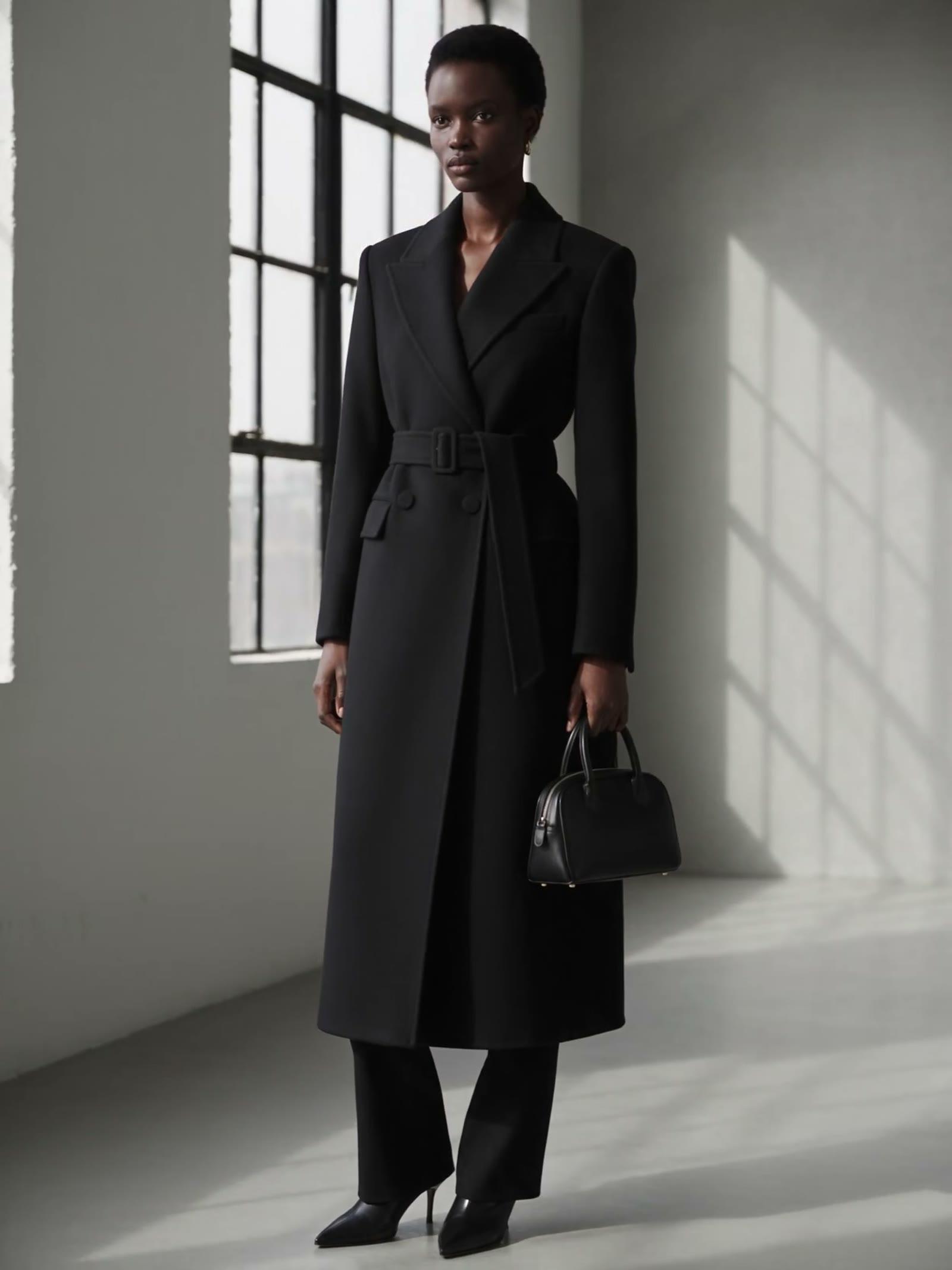
The photo, `image` (a generated model)
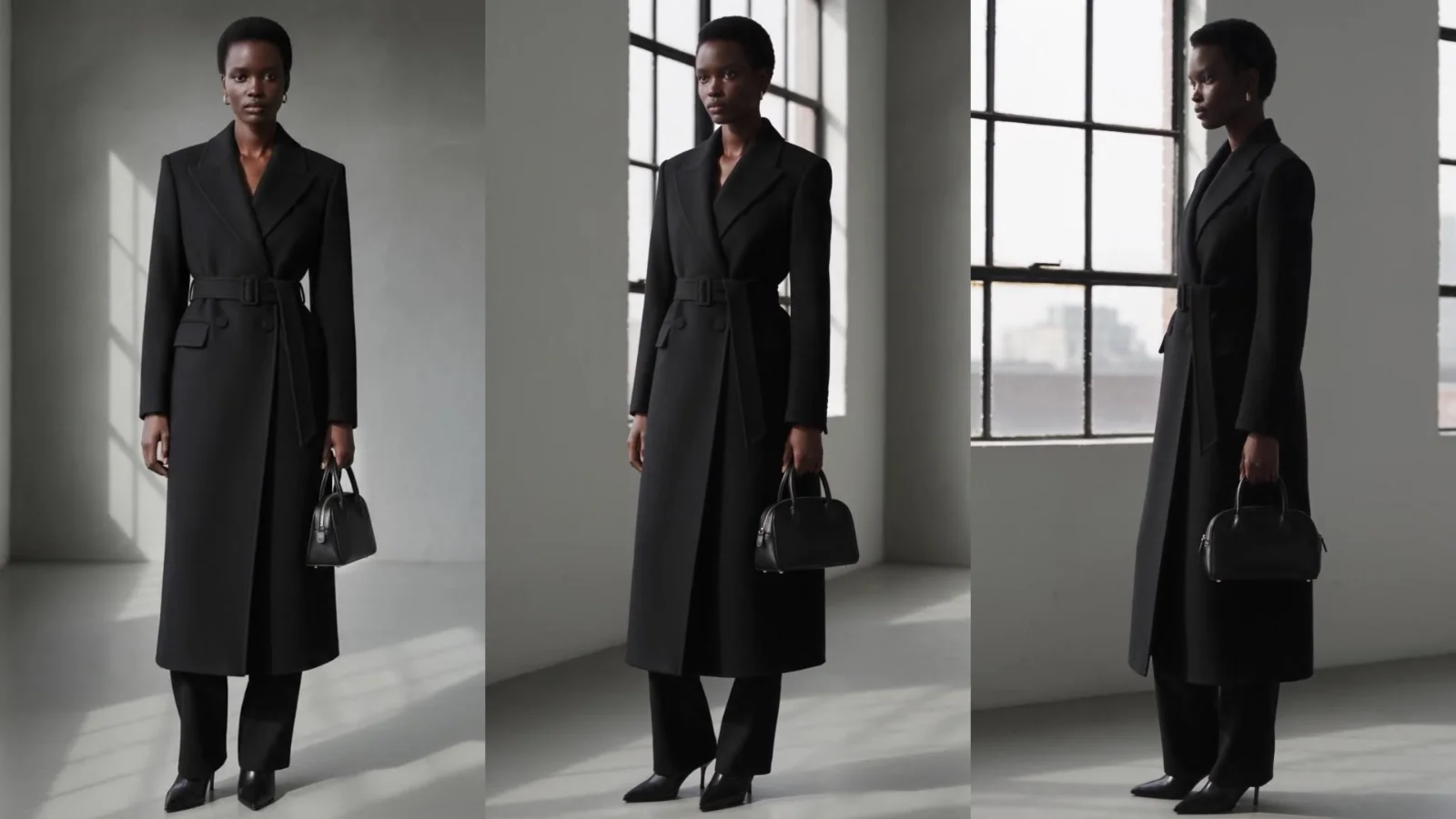
She holds her pose while the camera circles her.
- Camera preview
- After Segmind Orbiton
The shot opens on the photo and circles at an even speed until her face is in profile. Her face, coat, belt and bag hold all the way round; the window wall and city view it reveals were never in the photo, so the tool invents them.
Push in on a product, then rise above it
A brand or ad team needs a hero move on a product still for a product page or a launch reel: in toward the bottle, then up over it.
The photo, `image` (a generated product still)
The cigarette smoke drifts gently; the hand stays still on the bottle.
- Camera preview
- After Segmind Orbiton
The tool split the five seconds evenly: the push in runs to 2.5 seconds, then the camera rises. The shot follows the preview's path almost exactly, repairs the smeared cap, papers and ashtray, and keeps the label legible while the hand holds still and the smoke drifts. One slip: in the last half second a thin band of stray pixels shows along the top edge, carried over from the preview.
Slowly push in on a portrait
A filmmaker or social team wants a still portrait to feel alive: a slow move in on the face, with a blink and a breeze.
The photo, `image` (a generated person)
She holds her gaze on the lens and blinks once; a light sea breeze moves her hair.
- Camera preview
- After Segmind Orbiton
With Slow start, most of the move comes in the last two seconds, ending on a slightly closer frame of her face and shoulders. She blinks once, about three and a half seconds in, keeps her eyes on the lens and stays the same person throughout. The breeze is gentle: only a few loose curls lift.
Tips for good results
- Orbit a person seen full length, at Medium. That is where orbits work best. The turn varies between runs with the same settings, from about 60 to 90 degrees, so run it twice if the closing pose matters.
- Avoid Strong orbits for now. The one Strong orbit we ran (120 degrees, 4 seconds) never turned at all, although its preview did.
- Don't orbit a product held in a hand. In testing the camera made only a small part of the turn. Use Push in, Rise or a small Arc for products.
- Watch the camera preview. For every move except an orbit, the shot follows the preview closely: in our bottle, portrait and room runs, the shot's motion matched the preview's to within 1% at every second. The shot repairs small smears at the edges, but not large ones.
- Check rooms for objects close to the lens. In our room test, a Track right at Medium past sheer curtains near the lens tore the curtains and stretched the sofa across a third of the preview, and the shot kept those smears. If large parts of the preview look torn, expect the same in the shot, and pick another move or photo.
- Say what moves and what holds still. Short notes such as "the smoke drifts; the hand stays still" or "she blinks once" come through. Small motions stay small: the breeze in the portrait lifts only a few curls.
- Set the timing of two moves in the notes. With Then, the two moves split the length evenly (2.5 seconds each in the bottle example). For another split, write it in the notes, such as "push in for 3 s, then rise".
Use it from the API
Every input above is an API field with the same key, so you can run Segmind Orbiton from your own code: submit the photo URL and your settings, then poll until the shot is ready. The Segmind Orbiton API page has the request format and code samples.
Try a camera move on your own photo with Segmind Orbiton.
- #guide
- #ai-video
- #image-to-video
- #camera-movement
- #product-video
- #film-making