Guide to Segmind Gluon
A guide to Segmind Gluon, with examples: make a close-up insert or cutaway that matches your scene's clothes, props, light and grain.

Segmind Gluon makes the shot your edit is missing: a close-up insert or a cutaway that matches a scene you already have, with the same clothes, props, light, colour and grain. You give it a clip of the scene and one line describing the shot, and it gives you a short clip to cut in, for editors, ad teams and filmmakers who are short of coverage.
 PixelflowSegmind GluonMake the shots your edit is missing: Segmind Gluon turns a clip of your scene and one line of text into a matching insert or cutaway, with the same clothes, props, light, colour and grain. For ads, social and film. Up to 1080p, in H.264, HEVC 10-bit or ProRes.
What you give it
| Input | What to give it | Tip |
|---|---|---|
Scene clip (scene_clip) | A clip of the scene the new shot belongs in, from your edit or your rushes. | The look comes from the clip's middle frame, so trim it so the middle shows the clothes, props and light you want. |
Insert shot (insert_shot) | One line: what is in frame, the one thing that happens, and the camera move. | One simple action, done slowly. Say what is already in place when the shot starts. |
Duration (duration) | The length of the shot in seconds. | Every example in this guide is 4 seconds long; start there. |
Resolution (resolution) | 480p, 720p or 1080p. 720p is the default. | Test at 480p first, then finish at 1080p, which you need for labels and fine text. |
Delivery (delivery) | H.264 mp4 (plays everywhere), HEVC 10-bit mp4 or ProRes 422 HQ master. | H.264 for review and social, ProRes when the shot goes into a finishing timeline. |
Reference 1 (reference_1) | Optional. A photo of a product, prop or place your clip does not show. | A clear photo of the object is enough. Its background and light are ignored, and it is lit like your scene. |
Reference 2 (reference_2) | Optional. A second reference photo. | Use it for a second object, or another angle of the same one. |
Reference 3 (reference_3) | Optional. A third reference photo. | Leave the references empty when the clip already shows everything the shot needs. |
Examples
Add a close-up hand insert that matches your scene
You are cutting a dialogue scene and need a close-up of the actor's hand, to cover a cut or to give a moment weight.
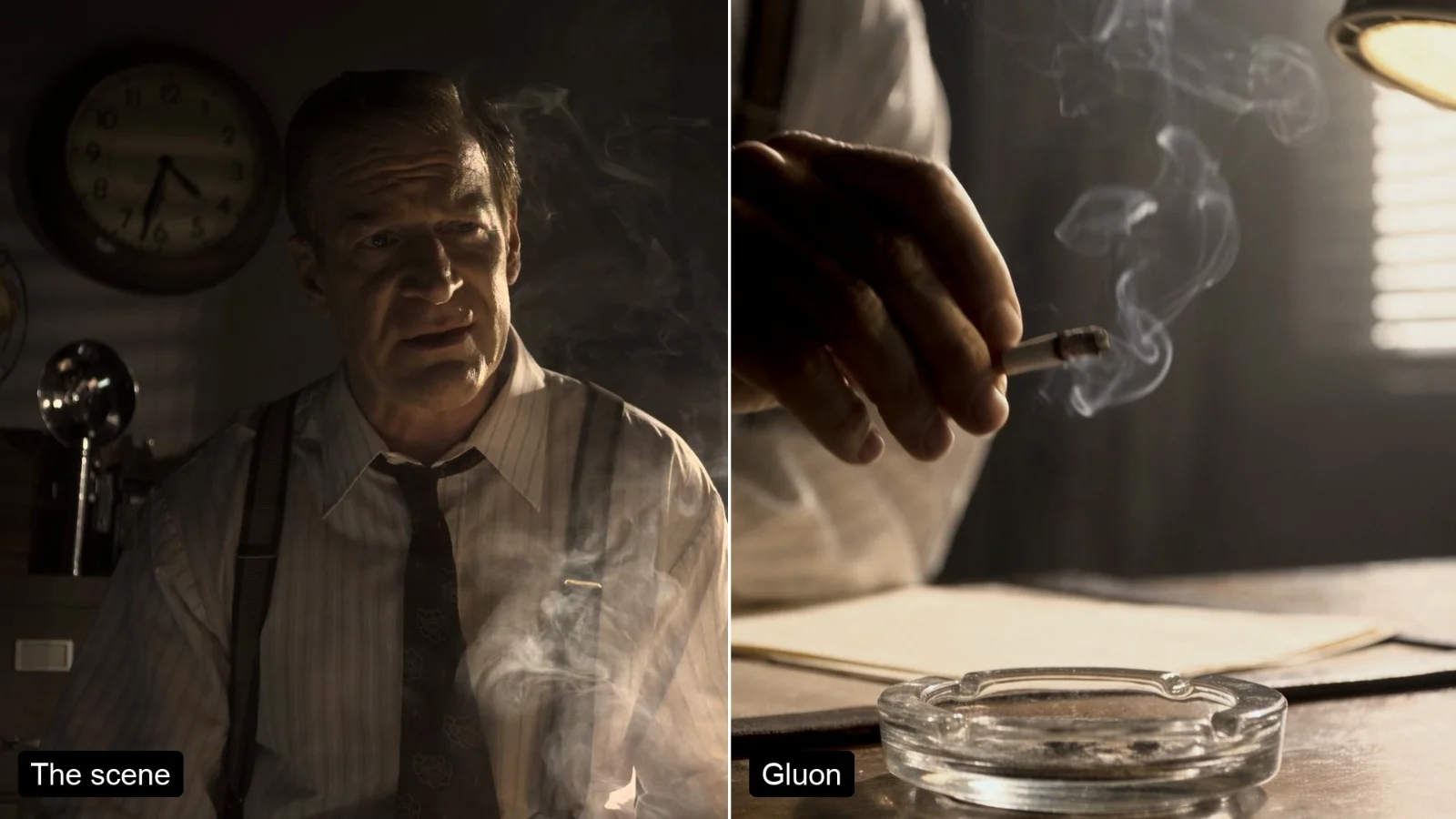
the camera slowly pushes in as his hand picks up a freshly lit cigarette from the glass ashtray on his desk and lifts it up out of frame, smoke trailing
- Your footage
- After Segmind Gluon
The pinstripe shirt, braces, tie, glass ashtray, typed papers, desk lamp and the stripes of light from the blinds all carry over in the scene's warm grade. The hand lifts the cigarette and carries it out of the top of the frame while the camera pushes in; asking for a "freshly lit" cigarette means no ash has to fall.
Source footage: Meridian (2016), Netflix, Inc., CC BY 4.0.
Make a cutaway of a prop with a slow push in
You need a beat of the room between two lines of dialogue: a cutaway to something on the set, with no actor in it.
the camera slowly pushes in on the lit desk lamp and the typed papers lying beside it on the desk, late-afternoon sun slanting through the blinds, dust drifting in the light, nobody in frame
- Your footage
- After Segmind Gluon
The gooseneck lamp, the desk stamp, the stacked papers, the blinds and the haze all come from the two-shot, and the lamp stays lit for the whole push in. Nobody is in frame. Parts of the room the scene never showed, such as the chair behind the desk, are made up to match.
Source footage: Meridian (2016), Netflix, Inc., CC BY 4.0.
Put a product from a photo into a film scene
You have a photo of a product and a scene it should appear in, and you want a close-up of that product on the set, under the set's light.
The product photo, `reference_1`
the camera slowly pushes in as his hand sets the bottle of whisky from the reference down on the desk beside the glass ashtray, the label facing the camera
- Your footage
- After Segmind Gluon
The bottle and its label come through from the photo, lit by the same window light, beside the same ashtray and smoking cigarette. The "sets it down" action did not happen: the bottle is on the desk from the first frame and his hand only rests on it while the camera pushes in. At 720p the small script on the label is soft, so use 1080p for labels.
Source footage: Meridian (2016), Netflix, Inc., CC BY 4.0.
Tips for good results
- Describe one simple action, done slowly. Small physical events look wrong: in our tests, a hand tapping ash off a cigarette made the ash fall in a way no cigarette sheds it, so avoid flicks, taps, pouring and dropping.
- Pair an object the hand moves with a slow camera move, as in "the camera slowly pushes in as his hand picks up X and lifts it out of frame". It gives the shot movement without asking for anything delicate.
- Name the starting state, so nothing has to appear or vanish. "A freshly lit cigarette" has no ash to fall; "the bottle standing on a rock" is already in place when the shot starts.
- Lift, slide or turn a product rather than setting it down. In the whisky example the bottle starts on the desk and the set-down never happens. A test asking a hand to lift a water bottle off a rock did lift it.
- Say the time of day and the weather when they matter. A test asking for "the street outside at dusk" came back in a rainstorm the scene does not have. The tool matches colour and grain to your clip, but what is in the shot comes from your words.
- Don't ask for lights to switch on or off. Lit lamps, windows and screens stay as they are; write "the lit desk lamp", not "he turns on the lamp".
- Write for hands, objects, screens and places. The tool frames any person so their face stays out of shot, so a face reaction close-up is not something it makes.
- If a run fails without a clear reason, run it again once. The shot's generated sound is sometimes rejected by a filter; in our tests the second attempt went through.
Use it from the API
Segmind Gluon runs through the same inputs from your own code: submit a request with your scene clip URL and the shot line, then poll until it completes. The API page has the request format and code samples: Segmind Gluon API.
Open Segmind Gluon and make the shot your edit is missing.
- #guide
- #ai-video
- #video-editing
- #insert-shots
- #b-roll
- #filmmaking