Star in a cinematic scene
Take the lead in a dramatic close-up, a chase or a trailer-style shot you have the rights to.
Put yourself in any video with one photo: Segmind Charm Collider swaps the person in a clip and keeps every move, expression, lip movement and camera move. For creators and fans, and for film and ad studios recasting a shot. Up to 1080p, with your clip's sound.
Your generated content will appear here
Example
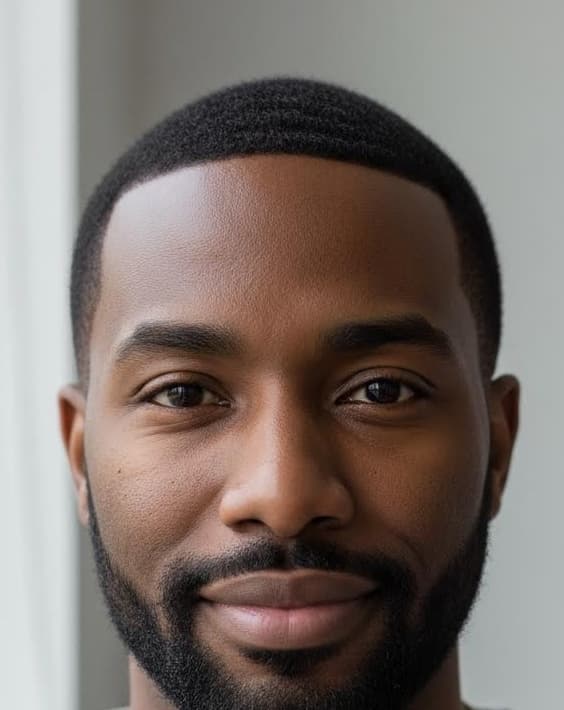
On the left, a shot from Tears of Steel (Blender Foundation, CC BY 3.0). On the right, the same take after one run with the photo of a generated person and the inputs below.
Your Photo
About this Pixelflow
Segmind Charm Collider puts the person from one photo into a video clip and keeps every move, expression, lip movement and camera move of the original. Creators use it to star in scenes, trends and memes. Studios and brands use it to recast a shot, make ad variants for each market or put a lead's face on a stand-in, without a reshoot.
Segmind Charm Collider is an AI video face and body swap that puts the person from one photo into a video clip. Give it a clip, a photo and a few words saying who to replace. It returns the same take with the new person in it: their face, hairstyle, skin tone and facial hair, with every movement, expression, lip movement and camera move from the original. The background and everyone else stay as they were. Then it finishes the take for posting or editing: your clip's exact length and frame rate, smooth motion, its grain and its sound.
Add one continuous shot with the person you want to replace.
A clear, front-facing photo of the face, of yourself or of someone who agreed to it.
Describe the person in the clip, such as the young man with dark hair, and pick whose clothes to keep.
Charm Collider returns your clip with the new person in it, at the clip's length and frame rate, with its sound.
You give
The workflow behind it
Which models run, and how, opens on the Business plan and above.
You get
For creators, fans and anyone who wants to be in the shot. Bring a clip and a selfie.
Take the lead in a dramatic close-up, a chase or a trailer-style shot you have the rights to.
Join a trending dance, skit or reaction format with your own face, on the original beat.
Put a friend, with their OK, into a birthday, wedding or farewell video moment.
Film a performance once, then put each member of your crew or series cast in it.
For film, TV and ad studios. The performance, camera and set stay; the person changes.
Replace an actor or an extra after the shoot has wrapped, keeping the take you already approved.
Turn one licensed performance into versions with different on-screen talent, each with the talent's consent.
Put the lead's face on the double or stand-in, so the shot cuts with the rest of the scene.
See how a candidate reads in the role, or pitch a scene with the intended actor's look before the shoot.
The new take lands at your clip's length and frame rate with the clip's own audio.
720p by default. Pick 1080p for close-ups, or 480p for a quick test.
The take is stretched back to your clip's exact duration and frame rate, with smooth optical-flow in-betweens.
The clip's own audio is put back, so the dialogue, music and lip sync line up.
The clip's grain is measured and added back, so the new face sits in the footage.
Use clips you own or have the rights to, and a photo of yourself or of someone who has given permission. Don't use Charm Collider to impersonate anyone or to make content that misleads.
The example clip is from Tears of Steel (c) Blender Foundation, mango.blender.org, licensed under CC BY 3.0. The actor was replaced with a generated, fictional person.
Star in cinematic scenes, skits and edits without filming them yourself.
Join a trending format with your own face while keeping the original moves and timing.
Put a friend, with their OK, into a birthday, wedding or farewell video.
Recast a role or fix a pickup shot after the shoot has wrapped.
Turn one licensed performance into versions with different on-screen talent for each market.
See how an actor reads in a scene before anyone is booked.
Building with it? Read the Segmind Charm Collider API docs.
One video clip of a single continuous shot, one photo of the person to put in it, and a few words saying who in the clip to replace.
Yes. Every movement, expression and mouth shape comes from the clip, and the clip's own sound is put back, so the new person speaks the original lines in time.
By default the clothes from the clip are kept, and the photo gives the face, hair, skin tone and facial hair. Clothes that show in the photo can still come through, so crop it to the head. Pick "wear the clothes from the photo" to dress them as in the photo instead.
Use clips you own or have the rights to, and a photo of yourself or of someone who has given permission.
720p is the default. Pick 1080p for close-ups and for shots where the face is small in the frame, and 480p for a quick test.
Yes. The same inputs run through the async API: submit the request, then poll until it completes.
 Cheapest 1080p video generator with audio
 Product B-Roll - Wan 3.0
 Lifestyle Product B-Roll Reel with Seedance 2.0 and Nano Banana 2
 Dynamic Product B-roll Video Creation with Seedance 2.0
 AI Greenscreen Removal with Kling Pro Motion Control
 Segmind Double Capsule
 Seedance 2.5 Draft to Full Quality Video
 PDF to Two-Host AI Podcast with Cover Art
Call it from your code with the same inputs you used here, or talk to us about running it at volume. Segmind is an authorised channel partner of ElevenLabs, Google, ByteDance, Alibaba, OpenAI, Kling and 40+ more AI providers.