Pro AI Tool

Segmind Double Capsule

AI video-to-video reshoots for film, TV and ad studios: keep the actor's performance and camera move, and change the location, lighting, season or props. Guided by one reference image, up to 1080p, 10-bit HEVC at your clip's exact length, frame rate and grain.

About 5m 25s a run

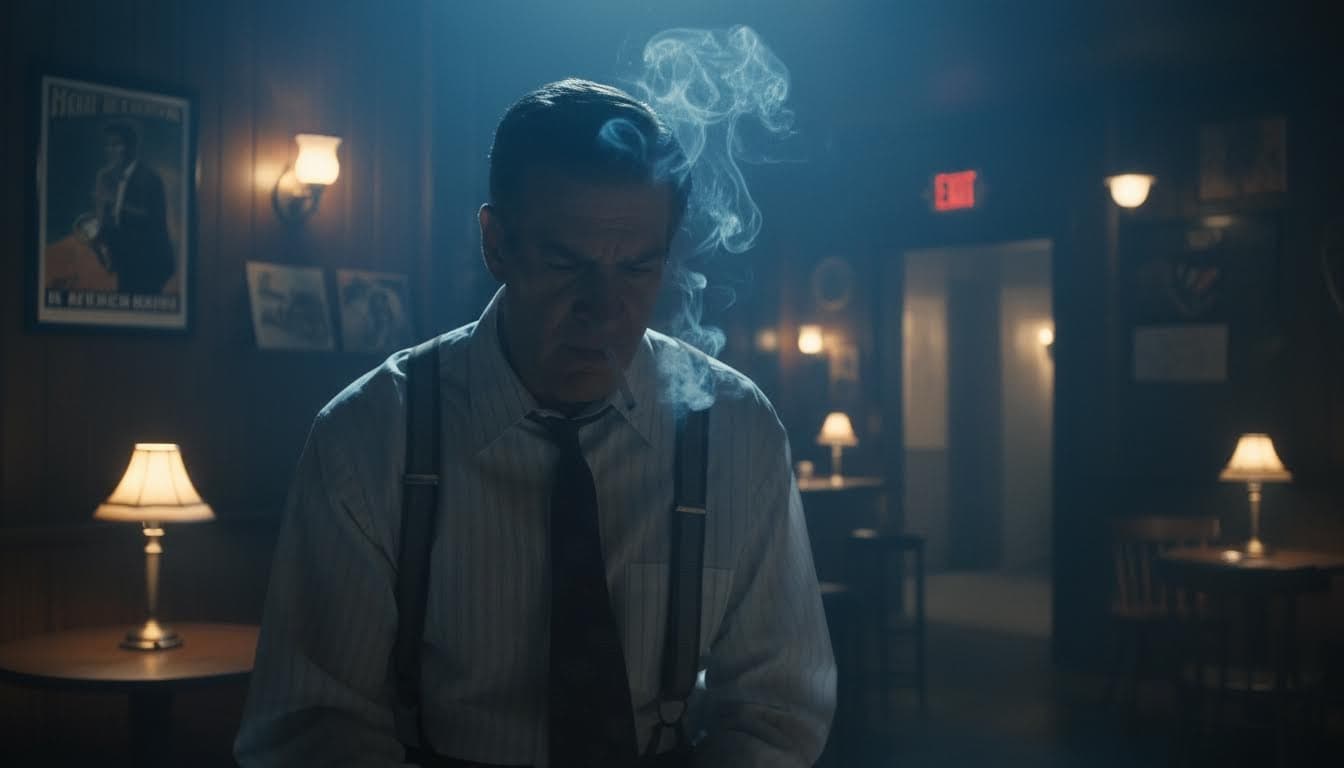
“Change the setting and the light to the back room of the 1920s jazz club in @Image 1: blue haze, warm brass table lamps; keep his cigarette smoke”

Your footage

Change

Keep
Smooth retime + grain match
Resolution

~5m 25s~$2.76for an average run

Edit workflow

Example

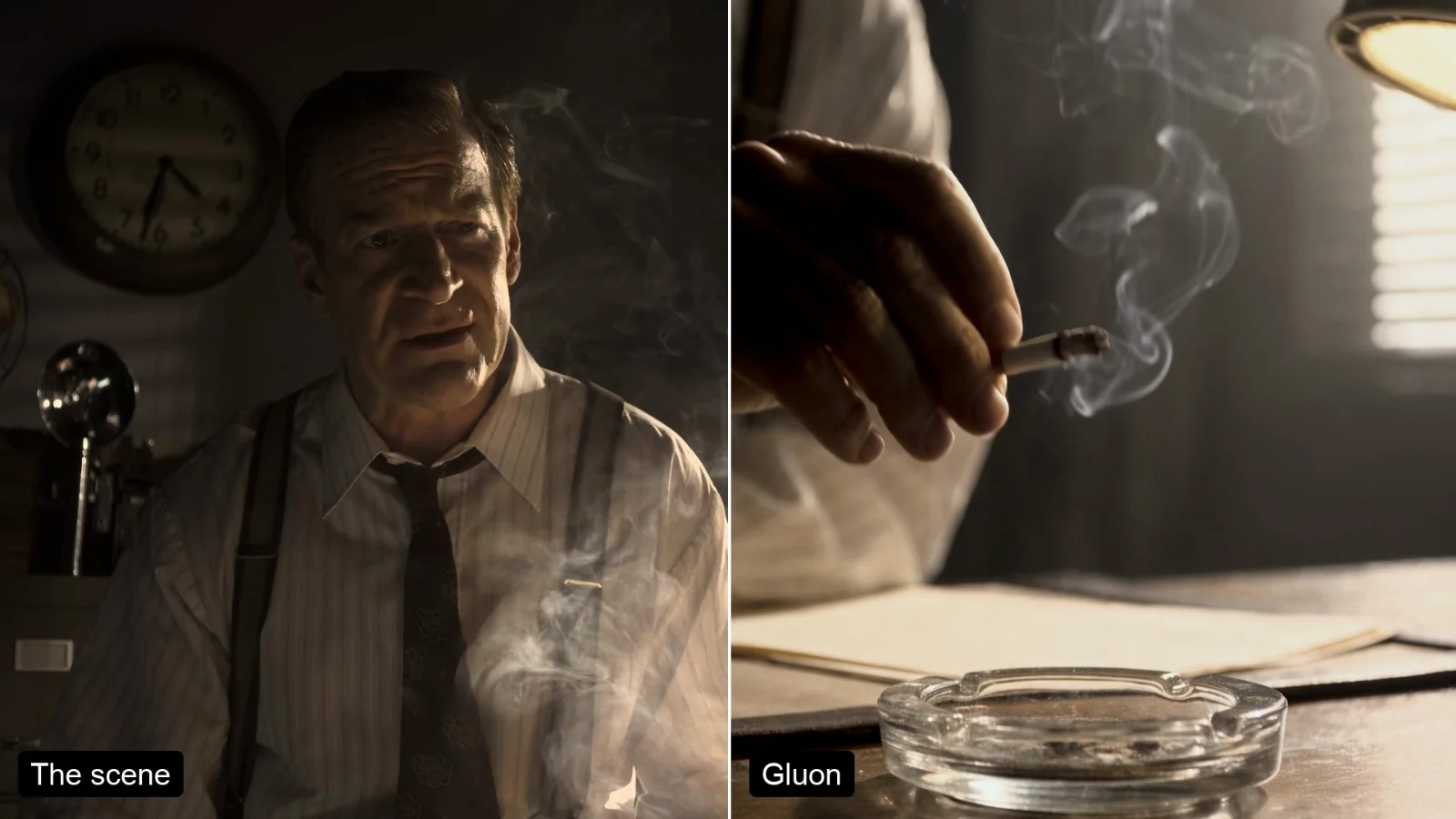
An AI reshoot, before and after

On the left, a shot from Meridian (Netflix, Inc., CC BY 4.0). On the right, the same take after one run, changed by the reference image and the sentence below it.

Your footage
After Double Capsule

Also given

  • Reference Image

    Reference Image
Resolution
1080p
Change
“Change the setting and the light to the back room of the 1920s jazz club in @Image 1: blue haze, warm brass table lamps; keep his cigarette smoke”
Keep
“the man in a white shirt, tie and suspenders”

Turn a grey studio shoot into a real location

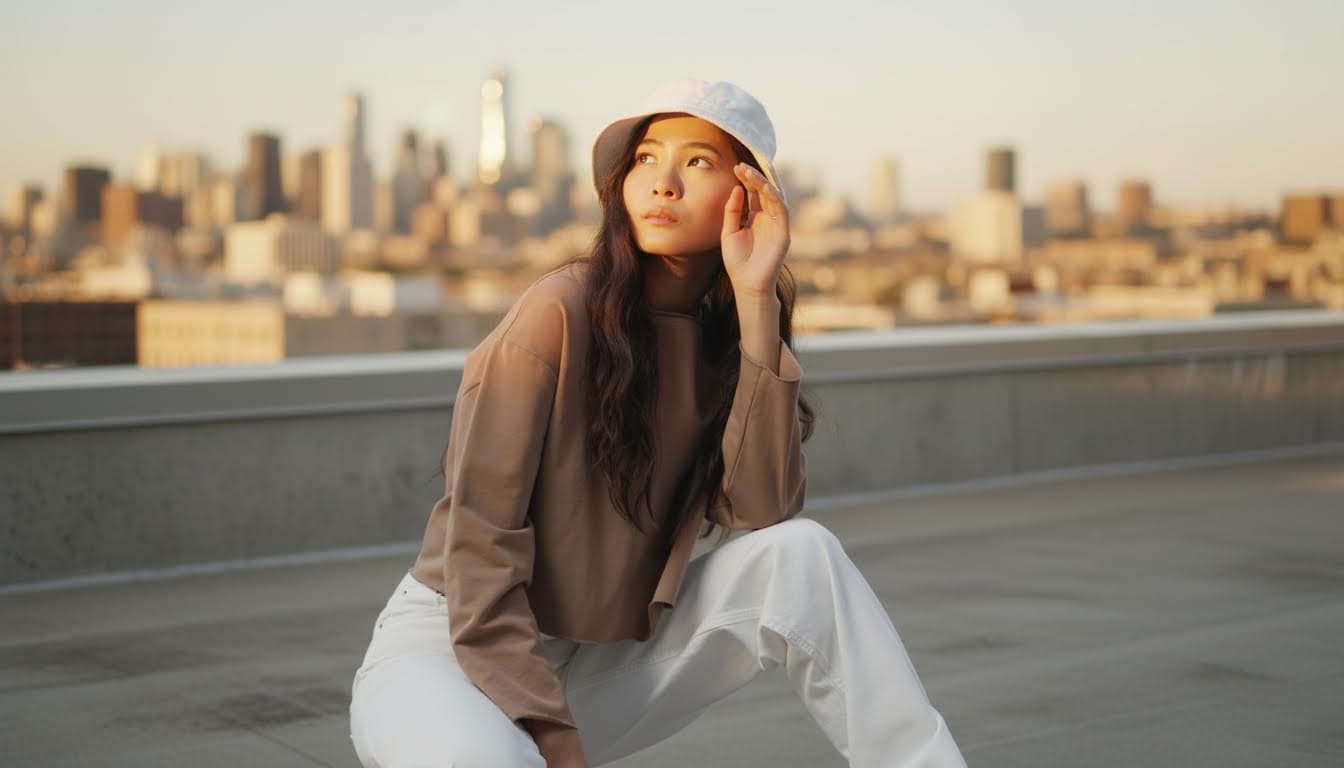
Shot on a plain grey backdrop under flat studio light. One run with a reference frame moved her to a city rooftop at golden hour, relit, with every pose and the camera tilt kept.

Shot on grey
After Double Capsule

Also given

  • Reference Image

    Reference Image
Resolution
1080p
Change
“Change the grey studio and the flat light to the sunlit concrete city rooftop at golden hour in @Image 1: a low parapet with the skyline softly out of focus behind her, warm low sun from the left; relight her to match, with warm light on her face and a soft shadow on the ground”
Keep
“the woman in a white bucket hat, long dark wavy hair, brown long-sleeved top and white trousers, her pose and every movement”
More examples, and what makes a good run, in the guide.

Guide to Segmind Double Capsule

About this Pixelflow

Same take. New world.

Segmind Double Capsule re-shoots a clip you already filmed in a new location, light, season or weather, keeping the actor, the performance and the camera move. Give it a shot, one reference image and one sentence, and it returns the same take, ready for your timeline.

Segmind Double Capsule is an AI video-to-video reshoot tool for film, TV, commercial and VFX studios. Give it a shot you have already filmed, one reference image and one sentence. It returns the same take in a new location, light, time of day, season or weather, or with a prop swapped. The actor's performance, timing, framing and camera move all come from your footage. A video model re-renders the take, then Double Capsule finishes the shot for your timeline: your clip's exact length and frame rate, smooth motion, your camera's grain and your sound, in 10-bit HEVC.

How Segmind Double Capsule works

  1. 1

    Upload your shot

    Add the clip you filmed and one reference image of the look you want.

  2. 2

    Describe the change

    Write one sentence: the new place, the light, the season or the prop to swap.

  3. 3

    Double Capsule re-shoots it

    It changes the world around the take and keeps the timing, framing and grain of your footage.

  4. 4

    Drop it in your edit

    You get the same take back at your frame rate and length, ready to cut.

You give

Source VideoReference ImageChangeKeepSmooth retime + grain matchResolution

The workflow behind it

Which models run, and how, opens on the Business plan and above.

See the Business plan

You get

New Shot

Change the location, light, season or props of a shot

Segmind Double Capsule changes the world around the take and keeps the take itself.

Location and set

Move the scene to a new place without a reshoot, from a 1920s jazz club to a garden, a street or a stage.

Relighting and time of day

Day for night, golden hour, moonlight through blinds, neon, haze.

Season and weather

Summer to snow, a dry street to rain, fog or a storm.

Props and products

Swap one object for a similar one (a desk lamp for a banker's lamp), or show a different product variant for a regional cut.

Previs to photoreal

Turn grey clay, greybox or blockout renders into photoreal shots that keep the animation and the camera.

Delivered ready for your timeline

The new shot lands at your clip's length and frame rate, so it drops onto the original in the edit.

  • Resolution

    1080p by default. Pick 720p or 480p to explore looks for less before a 1080p final.

  • Exact length and frame rate

    The raw take plays about 5% fast. The new shot is stretched back to your clip's exact duration and frame rate, so it drops straight onto the original.

  • Smooth retime

    Stretching a shot normally shows some frames twice. Double Capsule draws an optical-flow in-between in each of those slots instead.

  • Grain match

    Your camera's grain is measured and the missing part is added back, so the new shot sits beside real footage.

  • Your sound

    The source audio is carried over.

  • 10-bit delivery

    HEVC (H.265) Main 10 in an MP4 that plays in QuickTime, Safari and Chrome.

  • Raw take

    Switch off Smooth retime + grain match to get the raw take exactly as the model made it.

Segmind Double Capsule in detail

What stays the same

Name who stays in Keep, for example "the man in a white shirt, tie and suspenders".

  • The actor's performance and timing are kept.
  • The framing and camera move are kept.
  • Nobody new is added.

Double Capsule edits your clip rather than generating a new shot from a description, so the new take still cuts with the rest of your scene.

How to use it

  1. Upload your clip (4 to 30 seconds, one continuous shot).
  2. Upload a reference image of the new look: a location photo, a mood frame, or one frame of your shot changed in any image editor.
  3. Describe the change in one sentence, for example "Change the setting to the back room of a 1920s jazz club: blue haze, warm brass table lamps; keep his cigarette smoke."
  4. Say who to keep.
  5. Leave Resolution at 1080p, or pick 720p or 480p.
  6. Leave Smooth retime + grain match on (the default), or switch it off for the raw take.
  7. Run. A 5-second shot takes about six to seven minutes at 1080p, or about four at 480p.

Use it from your pipeline

Every Segmind template is also a REST API. Send source_video, reference_image, change, keep, resolution (480p, 720p or 1080p; default 1080p) and smooth_retime_and_grain_match (true or false), then poll for the result. That lets you batch shots from Python, JavaScript or your pipeline tools.

Tips

  • You pay for every second of the clip, so trim it to the shot you need.
  • The closer your reference matches the shot's framing, the more closely the result follows it.
  • Swap props for similar-looking ones so the actor's hands still fit.
  • Mention what must survive the change, such as smoke, rain or reflections.
  • Every run is a new take. Explore at 480p, then render the look you choose at 1080p.

Where Segmind Double Capsule fits

  • Reshoots without a reshoot

    Move a scene to a new location or time of day after the shoot has wrapped.

  • Commercial versions

    Make seasonal or regional versions of one ad without booking the crew again.

  • Previs to a final shot

    Turn grey previs into a photoreal shot to sell a sequence to a client.

Segmind Double Capsule FAQ

Building with it? Read the Segmind Double Capsule API docs.

What do I need to upload?

One video clip you filmed, one reference image of the target look and a sentence describing the change.

Does it keep the actor and the performance?

Yes. The performance, timing, framing and camera move all come from your footage; only the setting, light or prop changes.

Can I get 4K?

Yes. Run it at 1080p, then put the finished clip through a video upscaler on Segmind to take it to 4K.

Can I run it from my own code?

Yes. The same inputs run through the async API: submit the request, then poll until it completes.

What do I get back?

The same take in the new setting, at your clip's length and frame rate, ready to drop into your edit.

What is Segmind Double Capsule?

An AI video-to-video workflow on Segmind that reshoots footage you already have. It keeps the actor's performance and camera move and changes the world around them from one reference image and one sentence.

How is it different from text-to-video or image-to-video?

Those generate a new shot. Double Capsule edits your shot, so the performance, timing, framing and camera move are the ones you filmed, and the result cuts back into your edit.

What resolution does it output?

1080p by default; you can choose 720p or 480p instead. The file is 10-bit HEVC at your clip's exact length and frame rate.

How long can a clip be?

4 to 30 seconds per run. Split longer shots and run each part.

Does it keep the actor's face?

It keeps the performance, timing and framing. The model redraws every frame, so very fine skin and fabric texture can come out a little smoother than the camera original; grain match puts back your camera's grain.

Can I run it by API?

Yes. Every run on this page is also available as a REST API with the same inputs.

Put Segmind Double Capsule in your product

Call it from your code with the same inputs you used here, or talk to us about running it at volume. Segmind is an authorised channel partner of ElevenLabs, Google, ByteDance, Alibaba, OpenAI, Kling and 40+ more AI providers.