MAI Image 2.7 on Segmind: legible in-image text and edits that keep the details
Microsoft's MAI Image 2.7 generates photoreal images with accurate in-image text, from storefront signs to packaging labels. Its Edit model combines up to five images for precise swaps, text changes and relighting that keep details.
MAI Image 2.7 is Microsoft AI's in-house image model, built to create and edit design-ready images. It arrives in two tiers, MAI Image 2.7 and MAI Image 2.7 Flash. On Segmind it ships as two models: text to image creates a picture from a prompt, and edit changes or combines one to five images from an instruction. Both accept prompts up to 32,000 characters, return PNG, JPEG or WebP, and pick the tier through mode: standard for the best quality, flash for lower cost.
Text to image
MAI Image 2.7 Text to Image takes a prompt and returns one image at 1K or 2K, in seven aspect ratios from 9:16 to 16:9. Its strongest skill is lettering inside the picture. Put each string in double quotes and name the surface it sits on, and signs, labels and packaging come out spelled as written. Microsoft also lists photorealism, portraits and product design among its primary uses, and the cards below cover each.
 ModelMAI Image 2.7 Text to ImageText-to-image with accurate text on signs, labels and posters.
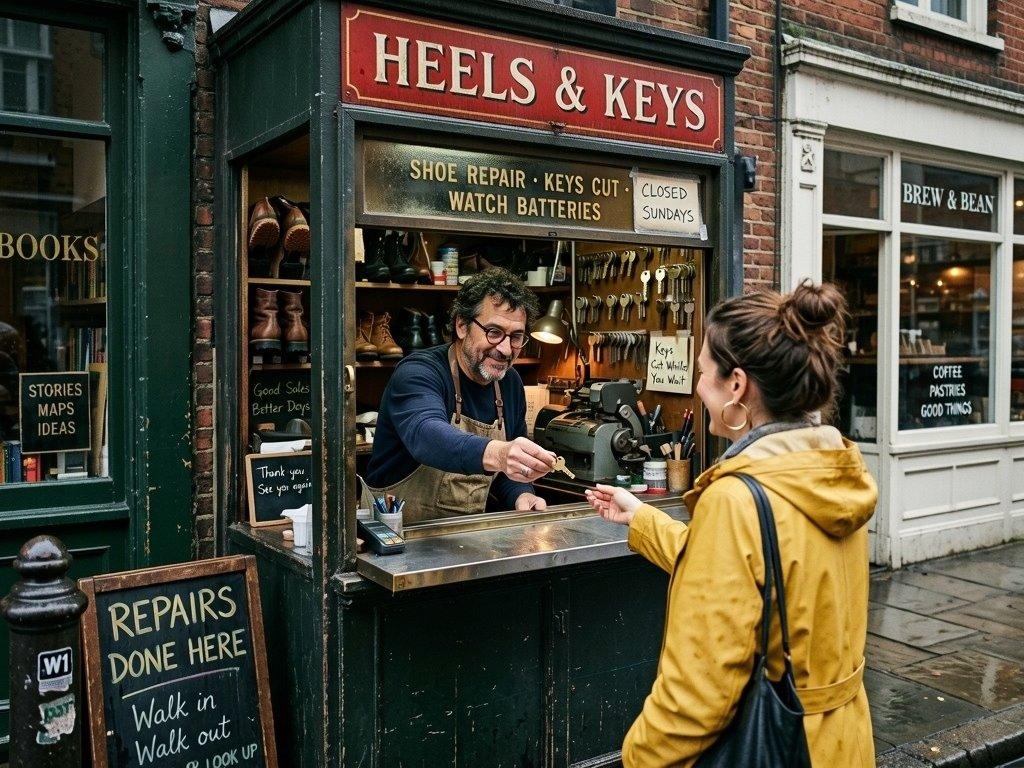
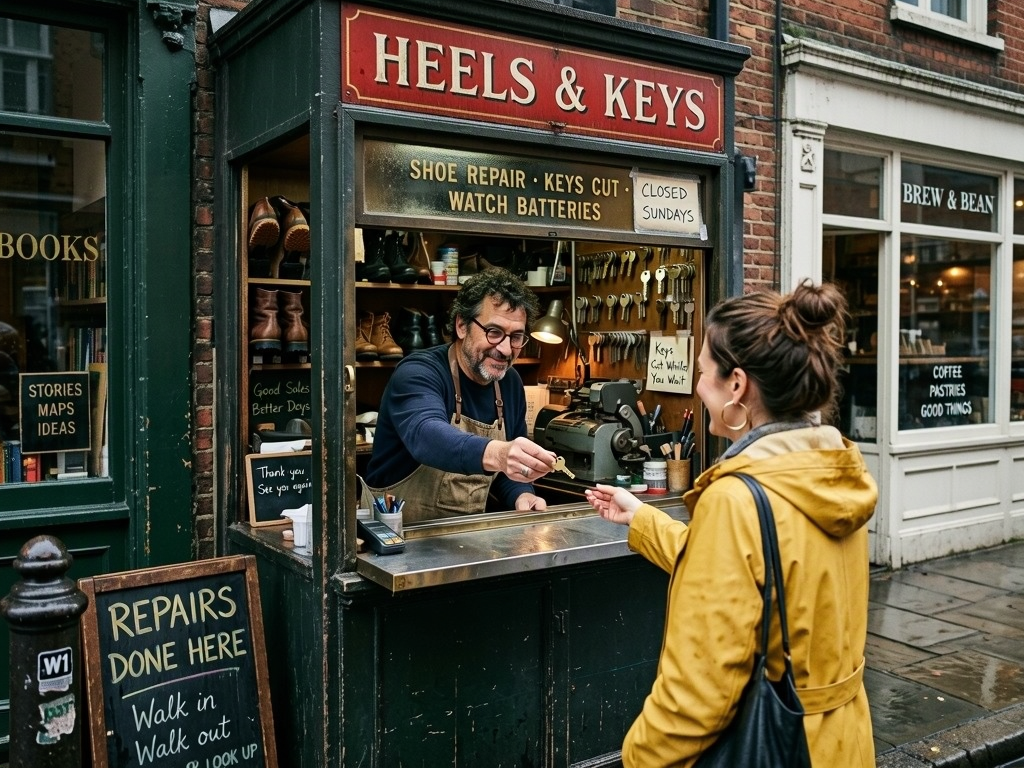
Street-level photo of a narrow shoe-repair and key-cutting kiosk wedged between two brick shopfronts. A red enamel sign above the hatch reads "HEELS & KEYS" in cream serif capitals; gold vinyl letters on the glass hatch read "SHOE REPAIR · KEYS CUT · WATCH BATTERIES"; a handwritten card taped to a corner of the glass reads "CLOSED SUNDAYS". The cobbler, in a canvas apron, passes a freshly cut brass key through the hatch to a woman in a yellow raincoat. Shelves of resoled boots and blank keys on hooks fill the kiosk behind him. Overcast morning light, 35mm street photography.
All three quoted strings render exactly, each in its own surface's perspective and light. The model also added neighbouring shop signs, so ask for plain walls when only your text should appear.
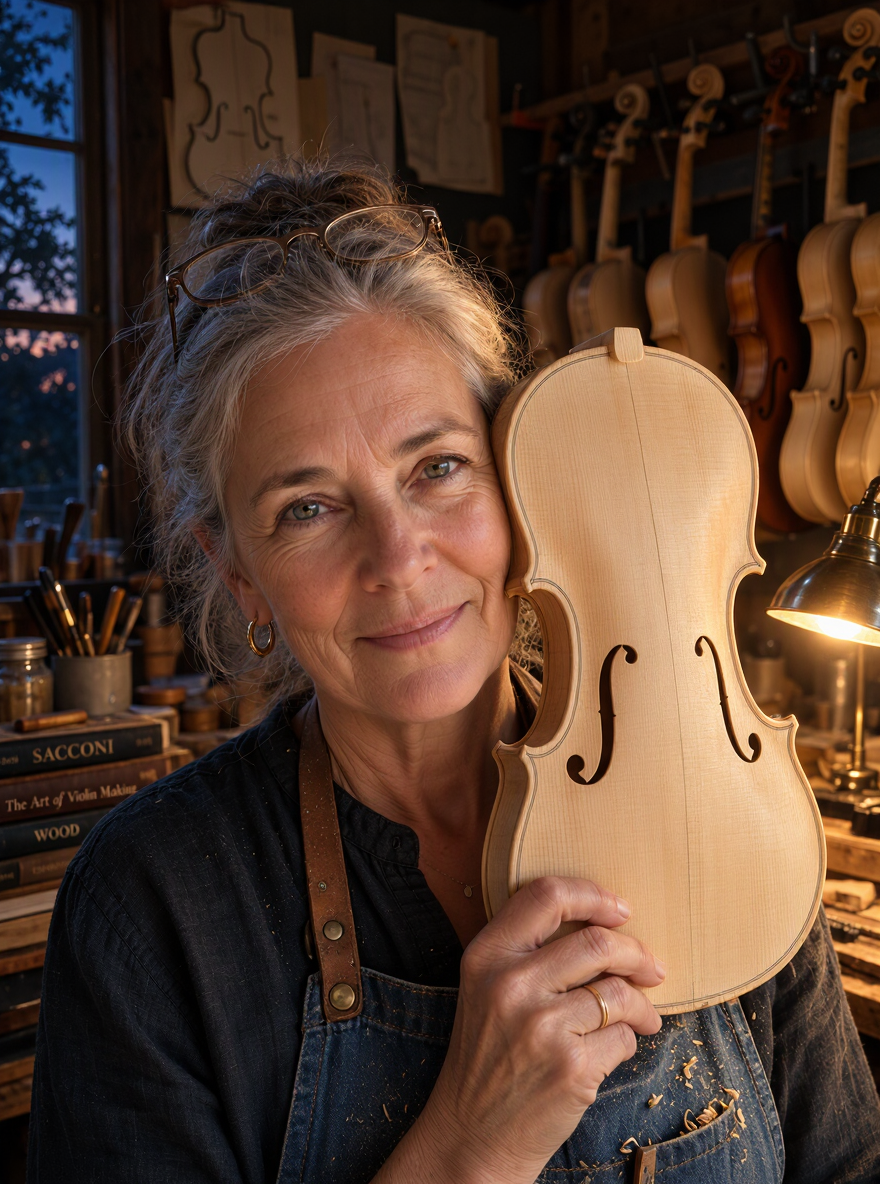
Head-and-shoulders portrait of a luthier in her sixties, silver hair tied back, wire-rim glasses pushed up into her hair and a dusting of spruce shavings on her denim apron. She looks straight into the lens while holding an unvarnished violin top up beside her cheek. Unfinished violin bodies hang from a rail behind her, out of focus. Window light from the left, 85mm portrait photography.
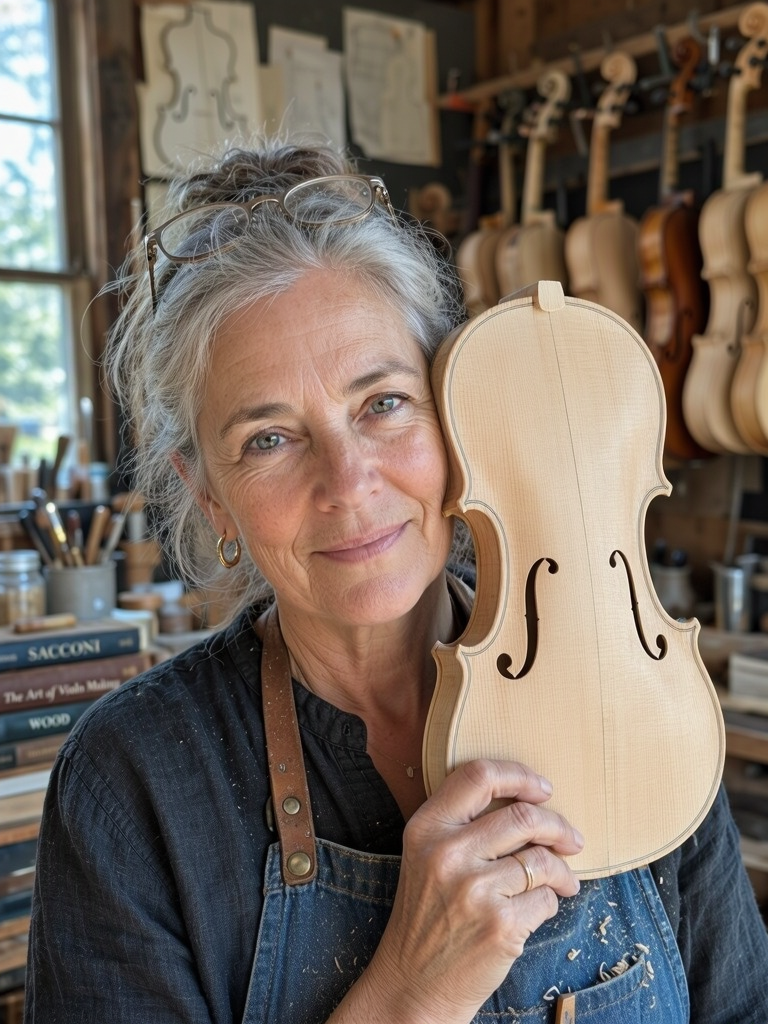
Skin texture, catchlights and the hand on the violin plate hold up. The book spines behind her picked up titles of their own, so ask for blank spines or plain props when stray text matters.
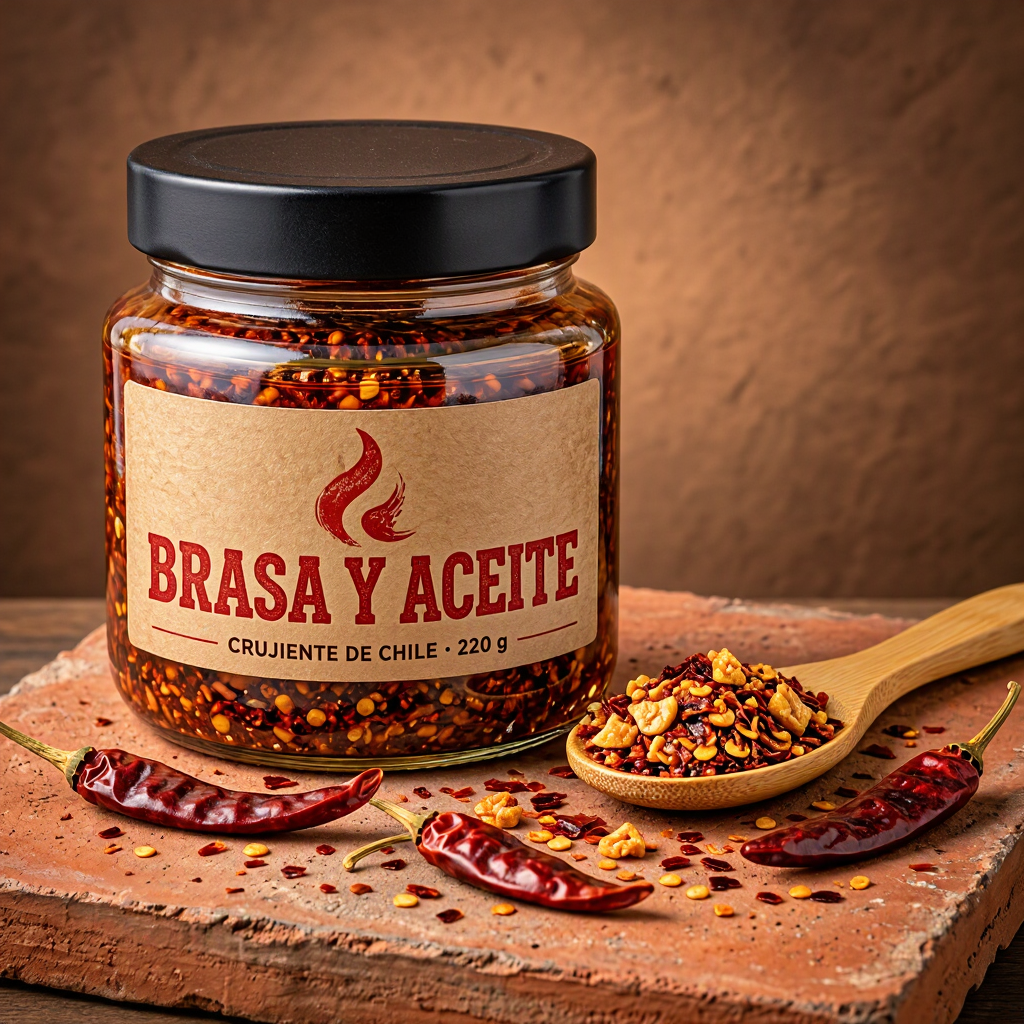
Studio packshot of a squat glass jar of chili crisp with a matte black screw lid, standing on a terracotta tile. Its kraft-paper label reads "EMBER & OIL" in bold red slab-serif capitals, with a smaller line below reading "SICHUAN CHILI CRISP · 220 g". A bamboo spoon rests beside the jar holding a heap of red chili flakes and fried garlic, and three dried chillies lie scattered on the tile. Even softbox light from above, commercial product photography.
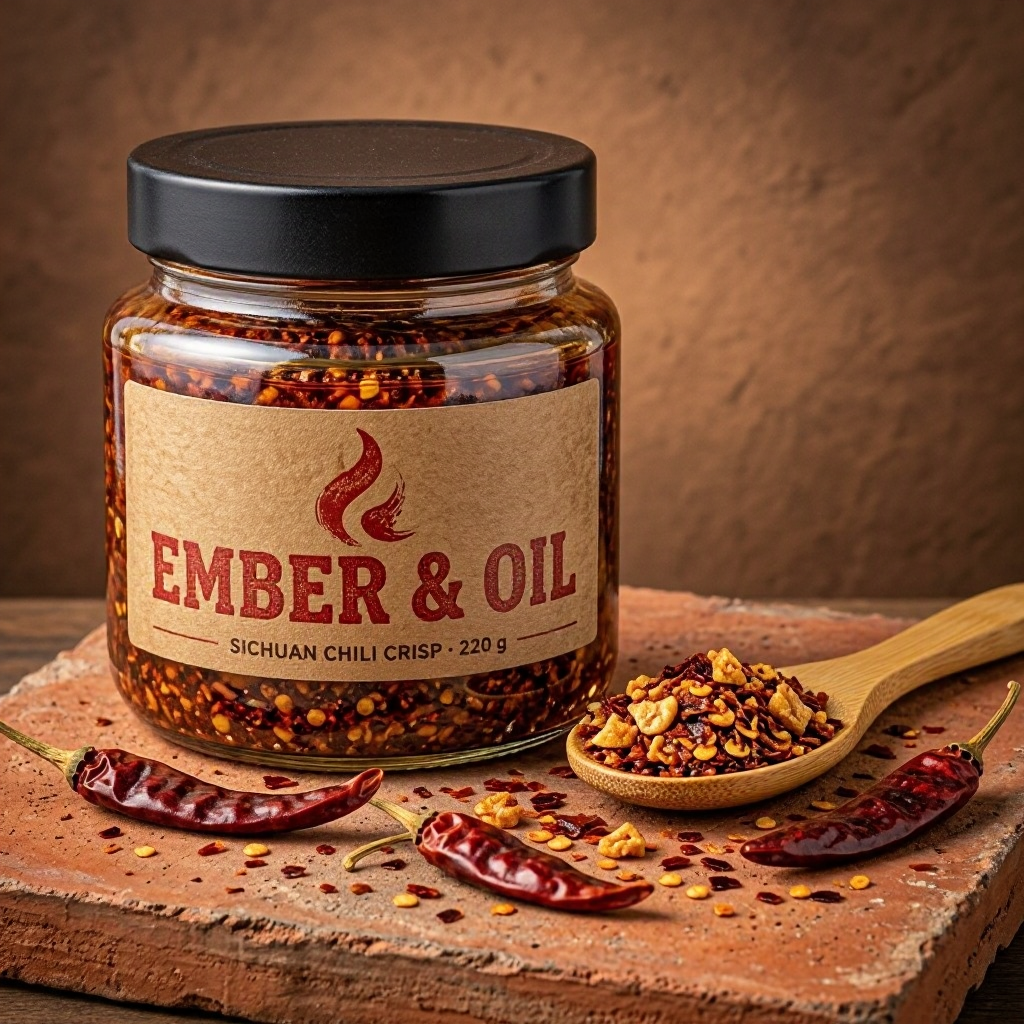
On the lower-cost flash tier, both label lines read exactly. Quote the brand and the small print as separate strings, and switch to standard at 2K for final packaging art.
Use text to image from the API
Send a prompt and the settings you want; the response is the finished image.
# pip install "segmind>=1.1.0"
# export SEGMIND_API_KEY="YOUR_API_KEY"
import segmind

result = segmind.run(
    "mai-image-2.7-text-to-image",
    prompt="Street-level photo of a narrow shoe-repair and key-cutting kiosk wedged between two brick shopfronts. A red enamel sign above the hatch reads \"HEELS & KEYS\" in cream serif capitals; gold vinyl letters on the glass hatch read \"SHOE REPAIR · KEYS CUT · WATCH BATTERIES\"; a handwritten card taped to a corner of the glass reads \"CLOSED SUNDAYS\". The cobbler, in a canvas apron, passes a freshly cut brass key through the hatch to a woman in a yellow raincoat. Shelves of resoled boots and blank keys on hooks fill the kiosk behind him. Overcast morning light, 35mm street photography.",
    mode="standard",
    aspect_ratio="4:3",
    resolution="1K",
    background="opaque",
    output_format="png",
)
print(result.get("output"))
# 1. Submit the request; the reply carries its request_id
REQUEST_ID=$(curl -s -X POST "https://api.segmind.com/v2/mai-image-2.7-text-to-image" \
-H "x-api-key: YOUR_API_KEY" \
-H "Content-Type: application/json" \
-d '{
"prompt": "Street-level photo of a narrow shoe-repair and key-cutting kiosk wedged between two brick shopfronts. A red enamel sign above the hatch reads \"HEELS & KEYS\" in cream serif capitals; gold vinyl letters on the glass hatch read \"SHOE REPAIR · KEYS CUT · WATCH BATTERIES\"; a handwritten card taped to a corner of the glass reads \"CLOSED SUNDAYS\". The cobbler, in a canvas apron, passes a freshly cut brass key through the hatch to a woman in a yellow raincoat. Shelves of resoled boots and blank keys on hooks fill the kiosk behind him. Overcast morning light, 35mm street photography.",
"mode": "standard",
"aspect_ratio": "4:3",
"resolution": "1K",
"background": "opaque",
"output_format": "png"
}' | jq -r .request_id)
# 2. Check its status until it is COMPLETED
curl -s "https://api.segmind.com/v2/requests/$REQUEST_ID/status" \
-H "x-api-key: YOUR_API_KEY"
# 3. Fetch the result
curl -s "https://api.segmind.com/v2/requests/$REQUEST_ID" \
-H "x-api-key: YOUR_API_KEY"Edit
MAI Image 2.7 Edit takes one to five reference_images and an instruction, and returns one edited image. Put the image you are editing first and refer to the others as image 2, image 3 and so on. Say what changes, then list what must stay: people, lettering and light outside the edit carry over from the input.
With aspect_ratio set to auto, the output follows the input's size, up to 2048x2048. Microsoft reports MAI Image 2.7 at No. 1 on the Artificial Analysis image-editing leaderboard at launch.
 ModelMAI Image 2.7 EditEdit and combine up to five images, keeping fine details.

Image 1 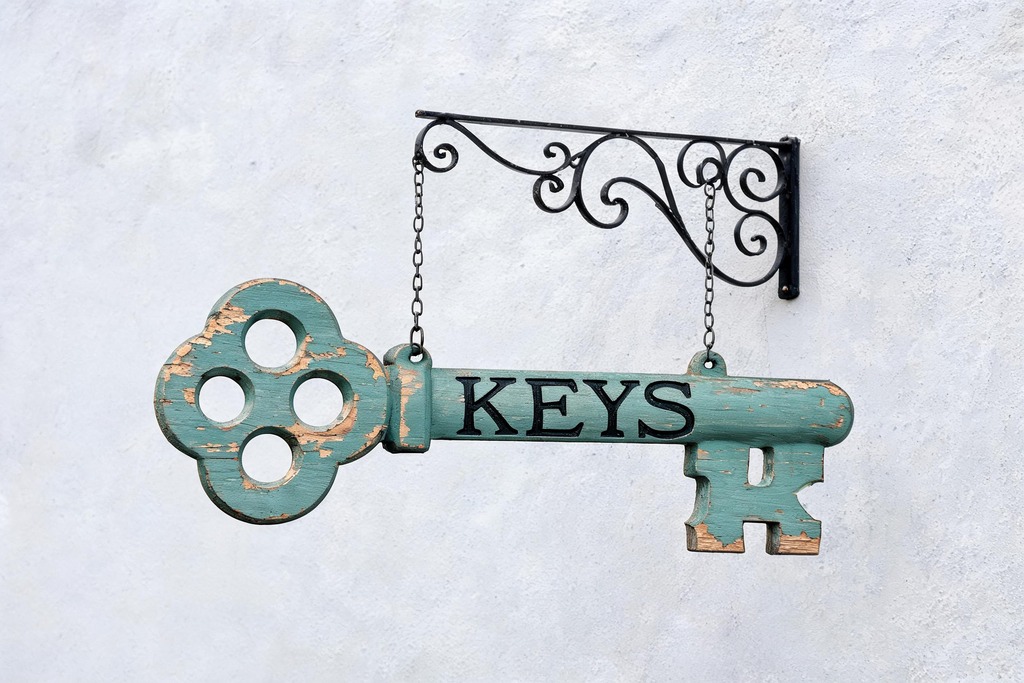
Image 2 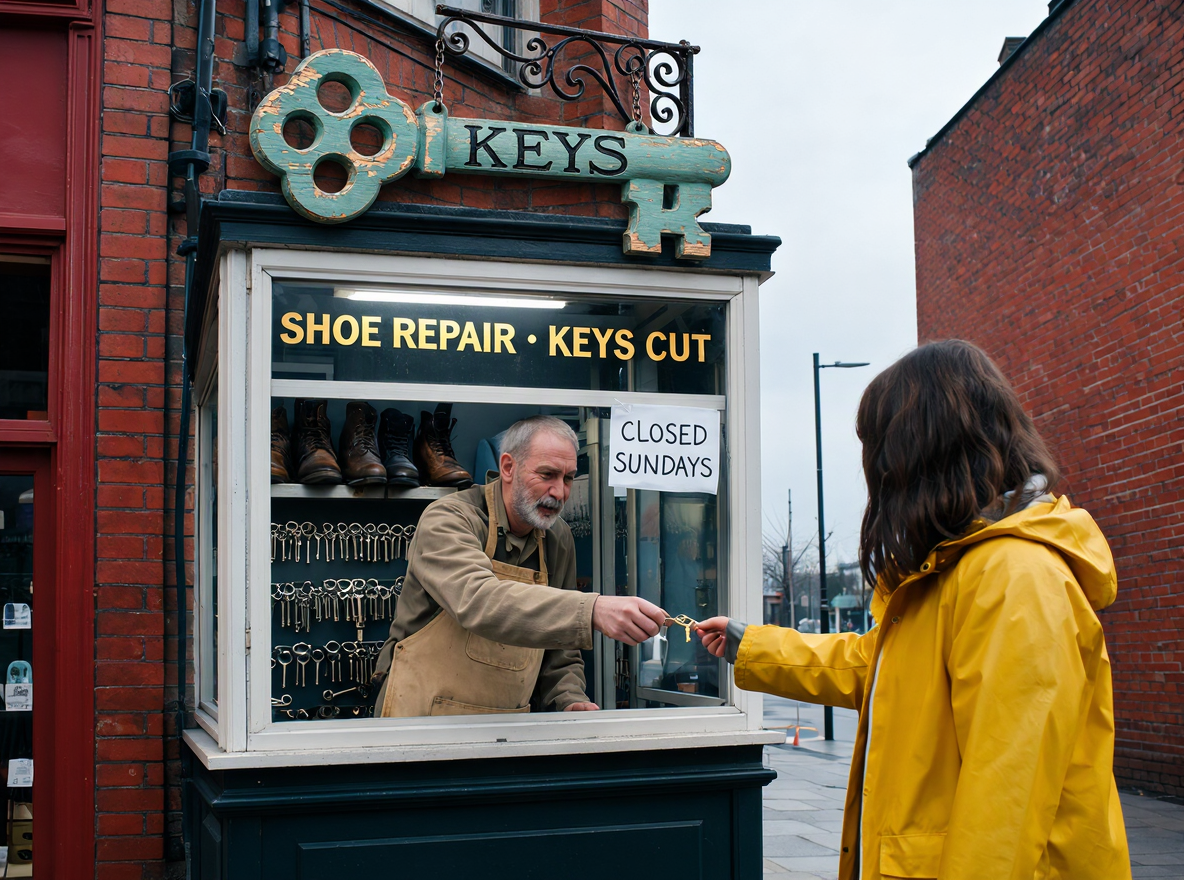
Output
The key keeps its chipped teal paint and carved KEYS letters, while the cobbler, the raincoat, the glass lettering and the CLOSED SUNDAYS card stay as they were. The full request, prompt included, is in the API block below.
 InputOutput
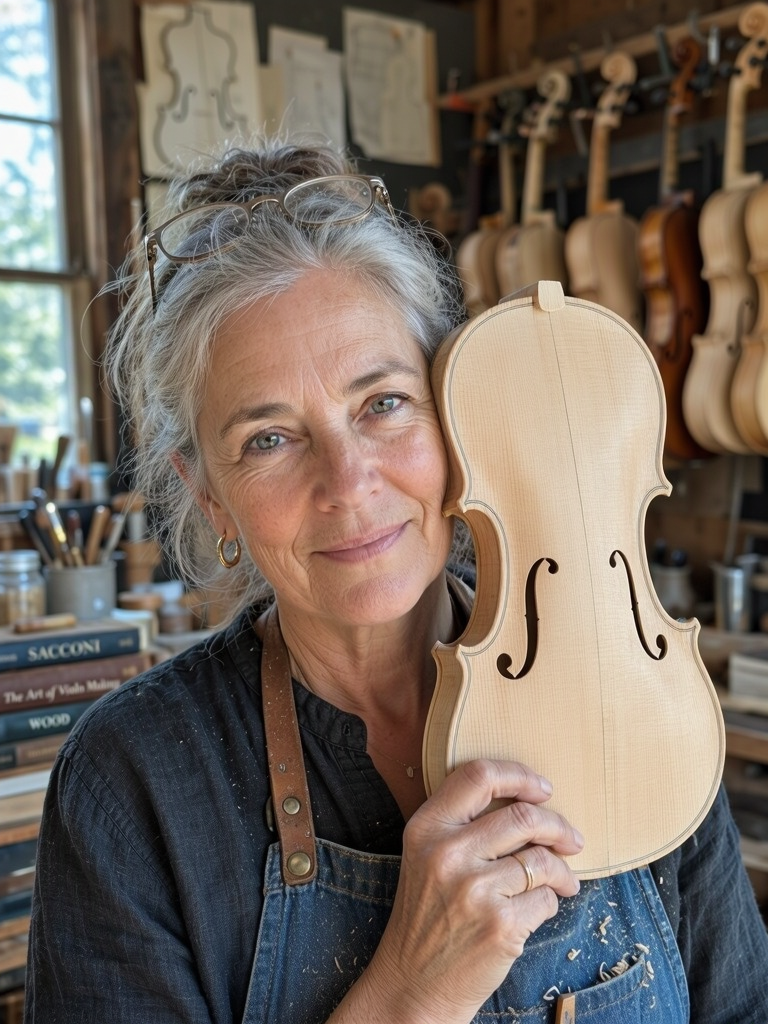
Relight this workshop portrait for night: the window on the left turns dark blue after sunset, and a single brass bench lamp just out of frame on the right lights her face and the violin top from the right side. Keep her face, smile, silver hair, wire-rim glasses, gold hoop earring, denim apron with spruce shavings, the unvarnished violin top and the hanging violin bodies exactly as they are.
The input is the portrait card from text to image above. The window turns dusk blue and a brass lamp lights her from the right, while her face, glasses, earring and apron carry over. The lamp landed inside the frame, so write "no lamp in frame" if it must stay out.
 InputOutput
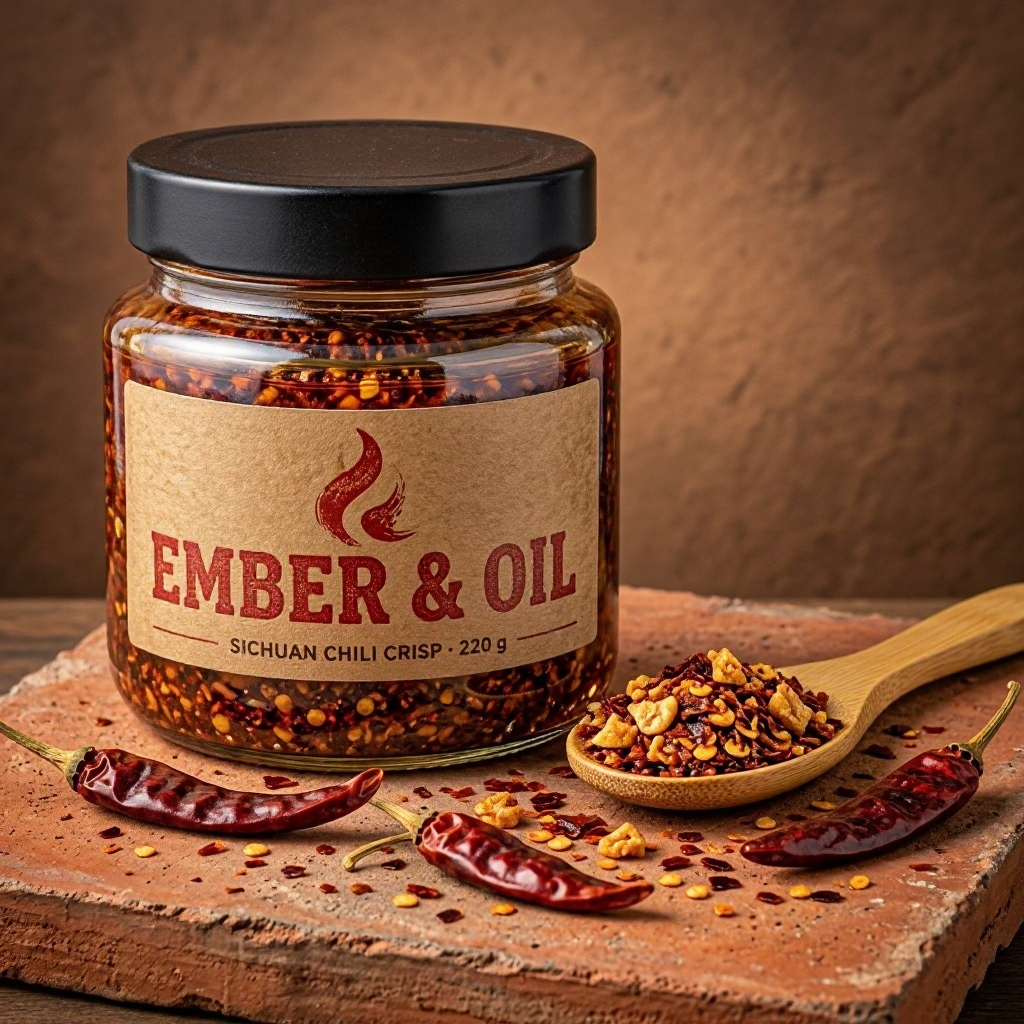
Translate the jar's kraft-paper label into Spanish: replace "EMBER & OIL" with "BRASA Y ACEITE" in the same bold red slab-serif capitals, and replace the small line below with "CRUJIENTE DE CHILE · 220 g" in the same small dark sans-serif. Keep the red flame mark, the glass jar, the black lid, the chili oil, the bamboo spoon, the dried chillies and the terracotta tile exactly as they are.
This card ran with mode set to flash on the packshot from text to image. The label reads BRASA Y ACEITE and CRUJIENTE DE CHILE · 220 g in the original red slab-serif and small sans-serif, and the flame mark, jar, spoon and chillies are unchanged. Quote every string on the label, small print included, so the model does not invent text.
Use edit from the API
Send the images in order with an instruction that names the change and what stays.
# pip install "segmind>=1.1.0"
# export SEGMIND_API_KEY="YOUR_API_KEY"
import segmind

result = segmind.run(
    "mai-image-2.7-edit",
    reference_images=[
        "https://segmind-resources.s3.amazonaws.com/input/mai-image-2.7-edit-kiosk-8a7923f8.jpg",
        "https://segmind-resources.s3.amazonaws.com/input/mai-image-2.7-edit-keysign-8dd4012e.jpg",
    ],
    prompt="Swap the red enamel HEELS & KEYS sign above the kiosk hatch in image 1 for the carved wooden key sign from image 2, hung from its wrought-iron scroll bracket on the brick wall in the same spot. Keep the key's faded teal paint, chipped bare-wood edges and black carved KEYS letters exactly as in image 2. Change nothing else in image 1: the cobbler, the woman in the yellow raincoat, the brass key between their hands, the gold SHOE REPAIR · KEYS CUT lettering, the CLOSED SUNDAYS card and the shelves of boots and keys stay as they are.",
    mode="standard",
    aspect_ratio="auto",
    resolution="1K",
    background="opaque",
    output_format="png",
)
print(result.get("output"))
# 1. Submit the request; the reply carries its request_id
REQUEST_ID=$(curl -s -X POST "https://api.segmind.com/v2/mai-image-2.7-edit" \
-H "x-api-key: YOUR_API_KEY" \
-H "Content-Type: application/json" \
-d '{
"reference_images": [
"https://segmind-resources.s3.amazonaws.com/input/mai-image-2.7-edit-kiosk-8a7923f8.jpg",
"https://segmind-resources.s3.amazonaws.com/input/mai-image-2.7-edit-keysign-8dd4012e.jpg"
],
"prompt": "Swap the red enamel HEELS & KEYS sign above the kiosk hatch in image 1 for the carved wooden key sign from image 2, hung from its wrought-iron scroll bracket on the brick wall in the same spot. Keep the key'\''s faded teal paint, chipped bare-wood edges and black carved KEYS letters exactly as in image 2. Change nothing else in image 1: the cobbler, the woman in the yellow raincoat, the brass key between their hands, the gold SHOE REPAIR · KEYS CUT lettering, the CLOSED SUNDAYS card and the shelves of boots and keys stay as they are.",
"mode": "standard",
"aspect_ratio": "auto",
"resolution": "1K",
"background": "opaque",
"output_format": "png"
}' | jq -r .request_id)
# 2. Check its status until it is COMPLETED
curl -s "https://api.segmind.com/v2/requests/$REQUEST_ID/status" \
-H "x-api-key: YOUR_API_KEY"
# 3. Fetch the result
curl -s "https://api.segmind.com/v2/requests/$REQUEST_ID" \
-H "x-api-key: YOUR_API_KEY"Side by side
Both models worked on the same kiosk subject, from two different starting points.
Text to image Edit
Text to image drew the whole kiosk, signs and people included, from one prompt. Edit took a separate kiosk photo and changed only its sign, using the carved key from a second image. Two of the edit cards start from text-to-image outputs, so you can generate a base image and then change one thing at a time.
Shared settings
| Setting | Value | Members | When to use it |
|---|---|---|---|
| prompt | text, up to 32,000 characters | both | quote every string to render; on edit, also list what must stay |
| mode | standard (default), flash | both | standard for final assets; flash for drafts and bulk variants at lower cost |
| aspect_ratio | 1:1 (default), 3:4, 4:3, 2:3, 3:2, 9:16, 16:9 | text to image | 4:3 or 3:2 for scenes, 2:3 or 9:16 for posters and stories, 1:1 for products |
| aspect_ratio | auto (default), or any of the seven fixed ratios | edit | auto keeps the input's framing; a fixed ratio sets the layout |
| resolution | 1K (default), 2K | both; on edit only with a fixed aspect ratio | 2K when small lettering must stay sharp |
| reference_images | 1 to 5 images, as URLs or base64 | edit | image 1 is the scene you edit; keep inputs near 1024 px |
| background | opaque (default), transparent | both | keep opaque for finished images (see below) |
| output_format | png (default), jpeg, webp | both | png for clean edges or another edit pass; jpeg or webp for delivery |
Good to know
- A transparent background needs png or webp output and can leave traces of green around the subject on both models. Keep the default opaque background for finished images.
- On edit, auto aspect ratio follows the input's size up to 2048x2048, and a larger input costs more. Use inputs around 1024 px. In the cards above, auto returned images slightly larger than their inputs and shifted the kiosk's framing a little, so set a fixed ratio when the exact size matters.
- Both models sometimes add text you did not ask for, such as neighbouring shop signs or book titles, and that small filler text can come out garbled. Quote every string that matters.
- Safety filters block public figures, trademarked material and graphic content, so prompts naming real people or brands may be refused. Microsoft released MAI Image 2.7 as a public preview, so behaviour and limits may change.
Resources
- Try MAI Image 2.7 Text to Image on Segmind · API reference
- Try MAI Image 2.7 Edit on Segmind · API reference
- MAI image models: capabilities, sizes and API reference — Microsoft's docs for the MAI image family: core capabilities (text rendering, portraits, product design), model comparison table, request parameters (prompt up to 32K tokens, width/height limits), response format and troubleshooting.
- MAI Image 2.7 / 2.7 Flash model card (PDF) — Microsoft's model card: 20B-parameter diffusion architecture, 32K-token context, 2048x2048 max output, primary use cases (text rendering, photorealism, portraits, product design), out-of-scope uses and safety evaluation.
- MAI Image 2.7 model page — Microsoft AI's overview of MAI Image 2.7 and 2.7 Flash: what each tier is for, benchmark standing at launch, partner quotes and links to the model card and data summary.
- Introducing MAI Image 2.7 and MAI Image 2.7 Flash — Microsoft AI's launch post: leaderboard results, fine-grained edit control, the Flash tier and the Canvas workspace in MAI Labs.
- #mai-image-2-7
- #microsoft
- #model-launch
- #image-generation
- #text-rendering